Tag: Q

Query Fan-Out erklärt: Die KI-Suche zerlegt eine Suchanfrage in mehrere Teilfragen, taismo SEO-Wiki

query fan-out

What is query fan-out?

Query fan-out is a technique used by AI search systems: The system breaks a search query into several subqueries, runs those subqueries against a search index at the same time and merges the results into a single answer. Google applies query fan-out in AI Mode and in AI Overviews. Because every subquery triggers its own search, how well a site covers those subqueries decides which pages get cited as a source in the AI answer.
Query fan-out explained: AI search breaks one search query into several subqueries, taismo SEO glossary

Term profile

Attribute Detail
Part of speech Noun, technical term from information technology
Pronunciation ˈkwɪəri fæn aʊt
Also known as Query splitting
Became known through Google’s description of AI Mode (2025)
Used in Google AI Mode, Google AI Overviews, AI search systems in general
Related terms AI search, search intent, topical authority

How does query fan-out work?

Query fan-out runs in three steps: Breaking down, searching in parallel and merging. Google describes the method in its documentation for site owners as the “query fan-out technique” and explains that the system issues multiple related searches across subtopics and data sources.

  1. Breaking down: A language model reads the query and forms several subqueries from it. A buying question turns into separate searches for providers, pricing, features and reviews.
  2. Searching in parallel: All subqueries run against the search index at the same time. Each subquery produces its own result list, supplemented by data from sources such as the Knowledge Graph.
  3. Merging: The language model condenses the results of all subqueries into one answer and links the pages the statements came from.

By Google’s own account this produces a wider and more diverse set of helpful links than a classic web search. Pulling fresh web pages while the answer is written follows the principle of retrieval-augmented generation; query fan-out is the step before that and defines what gets searched for in the first place.

Query fan-out in three stepsOn the left, the user question. Arrows fan it out into four subqueries covering providers, pricing, features and reviews, which run against the search index in parallel. On the right, the results merge into one AI answer with source links.1. Break down2. Search in parallel3. MergeUser questionone inputSubquery: providersits own search in the indexSubquery: pricingits own search in the indexSubquery: featuresits own search in the indexSubquery: reviewsits own search in the indexAI answerfrom all subqueriessource linksFig. 1 · taismo
Fig. 1: Query fan-out in three steps: One question is broken into subqueries that run against the index in parallel and flow together into one answer with source links.

Google uses the technique in both AI formats: In AI Mode as a search mode of its own and in AI Overviews above the classic results. What the AI mode means for clicks and visibility is covered in the guide to Google AI Mode.

Which subqueries does the AI generate?

The AI generates subqueries nobody typed: Rewrites, drill-downs, adjacent aspects and comparisons. In Google’s patent application “Search with stateful chat” (Google LLC, published on August 29, 2024) these additional queries are called synthetic queries. The document describes rewritten versions of the user query, supplemental queries and drill-down queries, among others.

In practice you can tell 4 types of subqueries apart:

  • Rewrite: The same question in different words, so that pages using another phrasing get found as well.
  • Drill-down: A narrower question about a single aspect, for example price, duration or a technical requirement.
  • Supplement: An adjacent aspect the person did not ask about, which still counts for the decision.
  • Comparison: A side-by-side look at two options as soon as the question involves a choice.

An example makes this tangible. The question “Which inventory management system suits a trade business with 30 employees?” produces subqueries like these:

Subquery Type Page that answers it
inventory management trade providers Rewrite Overview page
inventory management system cost trade business Drill-down Pricing page
inventory management trade measurement feature Drill-down Feature page
inventory management rollout duration Supplement Process guide
trade software reviews Supplement Reference or case study

Subqueries are phrased like longtail keywords: Long, specific and often a complete question. Each subquery carries its own search intent and gets answered separately. How many subqueries a system generates per query is something Google does not publish.

Classic web search answers one input with one result list. Query fan-out derives several queries from that same input and merges their results into one answer. That shifts which pages can become visible at all:

Attribute Classic web search AI search with query fan-out
Searches per input 1 several, in parallel
Result format List of 10 links Answer text with source links
Visible pages Pages for the main query Pages for each individual subquery
Strongest page the broadest page on the topic the page that answers one subquery precisely
Reach per website usually 1 ranking several pages of the same domain possible

This opens a chance for specialized subpages: A pricing page can get cited for the subquery about cost, while a reference shows up for the subquery about experiences. In a classic top 10 list both pages would have struggled to rank against the large overview pages.

What does query fan-out mean for your content?

Query fan-out rewards websites that answer many specific questions in clearly separated places. That leads to 4 consequences for content work:

  • One section, one question: AI systems pull individual sections as evidence. A paragraph that stays understandable without the rest of the text works as an answer to a subquery.
  • Subheadings as questions: A heading phrased as a real question matches the wording of the subquery and makes the section easy to assign.
  • Build specialized pages: Pricing, process, requirements and experiences each belong on their own page that answers that one question completely.
  • Connect a topic network: Only a connected network of pages covers the breadth of the subqueries. That is the core of topical authority.
Subquery coverage across one websiteOn the left, four pages of one website: service page, pricing page, process guide and a general info page. Three of them answer a subquery and get cited in the same AI answer on the right. The fourth stays uncited because no subquery matches it.Pages on your websiteOne AI answerService pageanswers one subqueryPricing pageanswers one subqueryProcess guideanswers one subqueryGeneral info pageno matching subquery×Answer textCited sourcesyour-website.com/services/your-website.com/pricing/your-website.com/process/Fig. 2 · taismo
Fig. 2: Subquery coverage: If a website answers several subqueries, it can appear as a source more than once in the same AI answer.

Structure, coverage and citability are the levers for visibility in AI answers.

Frequently asked questions about query fan-out

Can I see which subqueries Google generates for my page?
No. Google does not report the generated subqueries in Search Console or anywhere else. The closest signals are the questions people actually ask: People Also Ask, related searches and the questions that keep coming up in sales and support.

Does query fan-out only apply to Google?
No. The term comes from Google, and other AI search systems work on the same principle. ChatGPT and Perplexity also fire several searches for one question and build their answer from the pages they find.

Do I need a separate page for every subquery?
For most subqueries a self-contained section on a suitable page is enough. A page of its own pays off once a subquery carries enough search volume and the answer needs more room than a section allows.

quality score

What is Quality Score?

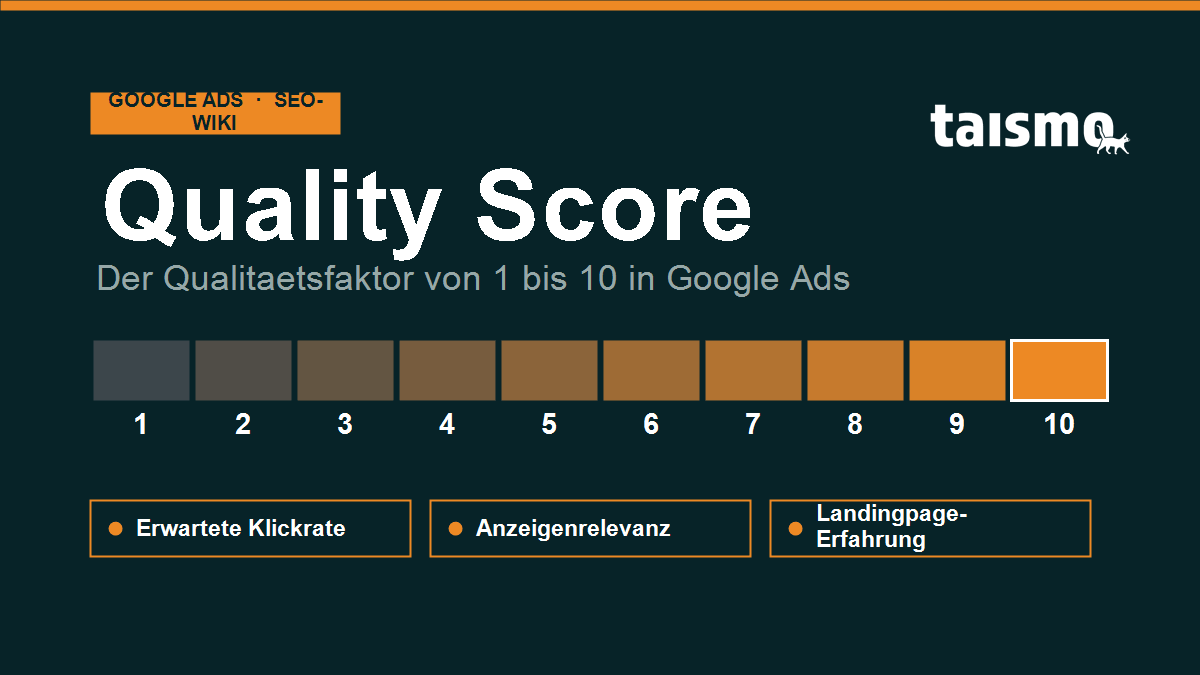
Quality Score is a metric in Google Ads that rates the quality of a keyword and its matching ad on a scale from 1 to 10. Quality Score is made up of three components: the expected clickthrough rate, the ad relevance and the experience people have with the landing page. A high Quality Score lowers your cost per click and improves your ad rank, a low one makes the same placement more expensive and pushes your position down.

Quality Score in Google Ads: the quality rating from 1 to 10 built from expected clickthrough rate, ad relevance and landing page experience

One point of orientation first: Quality Score belongs to Google Ads, the paid advertising system, and not to organic search engine optimization. It affects only the placement and the price of text ads in the search network, never your position in the unpaid results. An advertiser who reaches a high quality level pays less for the same position than a competitor with a weak quality rating.

Quality Score at a glance

Attribute Detail
Term Quality Score (German: Qualitätsfaktor)
System Google Ads (paid search ads), not organic SEO
Scale 1 to 10 (10 = best quality)
Level of assessment per keyword in the search network
Components expected clickthrough rate, ad relevance, landing page experience

Quality Score is a diagnostic value. Google calculates it from historical performance data and reports it as a number between 1 and 10. In the live auction Google draws on more detailed real time signals, but the reported figure bundles the same quality signals. That makes it the single most useful indicator for judging how efficiently a Google Ads account works.

Which 3 factors make up the Quality Score?

Google calculates the Quality Score from exactly 3 factors, each of them rated as above average, average or below average:

  1. Expected clickthrough rate (expected CTR): how likely people are to click your ad when your keyword triggers it. Google estimates this from past performance, adjusted for position and ad format. The clickthrough rate itself is the share of impressions that turn into clicks.
  2. Ad relevance: how closely the ad matches the search intent behind the keyword. If the keyword appears naturally in the ad text and the ad meets what the searcher expects, relevance goes up.
  3. Landing page experience: how relevant, transparent and usable the destination page is after the click. Load time, mobile presentation and how well the content fits the promise all count here.

Every one of these factors feeds into the overall score. If even a single factor sits at below average, that is your first place to start. Google shows the three status values right next to the number, so the weak spot is easy to spot.

The three factors behind the Quality ScoreExpected clickthrough rate, ad relevance and landing page experience come together in the Quality Score, which Google reports on a scale from 1 to 10.Expected CTRAd relevanceLanding pageexperienceQualityScore1 to 10Fig. 1 · taismo
Fig. 1: The three factors of the Quality Score, expected clickthrough rate, ad relevance and landing page experience, add up to the value from 1 to 10.

Why Quality Score matters for CPC and ad rank

Quality Score matters because it feeds straight into Ad Rank and therefore into your cost per click. For every search query Google runs an auction that decides which ad appears in which position. Simplified: Ad Rank = bid × quality, plus further factors such as the expected impact of ad extensions.

Ad Rank from bid and qualityAd Rank in Google Ads is the bid multiplied by quality, and the Quality Score is part of that quality. A high Quality Score improves the position and lowers the cost per click.How Google decides ad positionBidmax. cost per click×Qualityincl. Quality Score=Ad Rankposition in the auctionHigh Quality Score = better position at the same bid and often a lower cost per click.Fig. 2 · taismo
Fig. 2: Ad Rank is the bid multiplied by quality. A high Quality Score lifts the position and tends to lower the cost per click.

From that follows the central economic effect: two advertisers can land in different positions with an identical bid, because their quality differs. A high Quality Score lets you reach the same position with a lower bid. In practice that means measurably lower costs per click and a better return on ad spend. This is exactly the lever that professional Google Ads management works on to get more out of the same budget.

How do you improve your Quality Score?

You improve your Quality Score by deliberately strengthening all 3 underlying factors. These 5 measures work most directly:

  1. Keep ad groups tightly themed: the closer a keyword set fits one ad group, the more relevant the ad looks. A few closely related keywords per group beat large catch all groups.
  2. Put the keyword in the headline and the ad text: the searched keyword in the headline and the description raises ad relevance and signals a match right away.
  3. Align the landing page with the keyword: the destination page has to deliver exactly what the ad promises. A matching headline, a clear reference to the search term and a visible next step lift the landing page experience.
  4. Improve load time and mobile usability: slow pages, or pages that are awkward to use on a phone, drag the user experience down. Short load times pay straight into the landing page factor, which is why the Core Web Vitals of your destination page are worth a look.
  5. Test ad texts continuously: run several variants against each other and retire the weak ones. A rising clickthrough rate lifts the expected CTR and with it the Quality Score.

Improvements do not show up at once, because Google draws on historical performance data. After a change the account first has to collect new click and interaction data before the quality rating climbs. A few weeks of patience are part of the work.

Where do you see the Quality Score in Google Ads?

You see the Quality Score in Google Ads at keyword level. In the keyword table you switch on the Quality Score column through the column menu, together with the three detail columns for expected CTR, ad relevance and landing page experience.

You can also display the historical Quality Score. Those columns show the value and the three status entries for the last day of a chosen period, so you can follow how the quality rating of a keyword developed over time and whether an optimization worked. If a keyword shows a dash instead of a number, it has not yet collected enough impressions to be rated.

Quality Score and organic SEO: the difference

Quality Score applies to paid ads only and has nothing to do with your organic Google ranking. Both systems judge quality, but they work separately and with their own signals.

  • Quality Score (Google Ads): rates keyword and ad from 1 to 10 and steers the cost per click and the position in the ad auction. It hits the advertising budget immediately.
  • Organic SEO: decides how a page ranks in the unpaid search results. Content, technical structure, linking and user signals count there, and that groundwork is the field of ongoing SEO support.

There is one useful overlap: a fast, relevant and usable landing page helps both sides. It lifts the landing page experience inside the Quality Score and strengthens the organic visibility of the very same page. Anyone who plans ads and SEO together uses that shared foundation, while still paying in Google Ads according to the quality rating, and the organic position stays untouched by it. More terms from both worlds are collected in the SEO glossary.

Frequently asked questions about Quality Score

What is a good Quality Score?
A value of 7 to 10 counts as good, 5 to 6 as average, 1 to 4 as in need of improvement. The ideal target depends on your industry and your competition, but anything below 5 deserves deliberate work.

Is Quality Score a direct ranking factor at Google?
No. Quality Score applies to paid Google Ads only and influences their position and their price. It has no effect on the organic ranking in search.

Does a low Quality Score really cost more?
Yes. Because Ad Rank comes from bid and quality, an advertiser with a low quality rating has to bid more to hold the same position. A high Quality Score lowers the cost per click for the same placement.

How quickly does the Quality Score improve?
Not immediately. Google bases the value on historical performance data. After an optimization it usually takes a few weeks until enough new data has come in and the quality rating rises.

Get insider knowledge first!
taismo Logo

© taismo GmbH

Address


Weißenfelder Str. 6
85551 Kirchheim near Munich, Germany
