Cloaking is a spam technique in which a web server delivers different content to search engine crawlers than to human visitors in order to manipulate rankings. Google’s spam policies define cloaking as presenting different content to users than to search engines, and the violation is punished with ranking losses up to complete removal from the index. Cloaking belongs to the black hat SEO techniques.
How does cloaking work technically?
The web server decides on every request which version of the page to serve. To do so, it checks two attributes of the visitor: the user agent (does the request identify itself as “Googlebot”?) and the IP address (does the request come from the known address ranges of search engine crawlers?). If the server detects a crawler, it serves a specially prepared, keyword-optimized version; real visitors see different content.
Google’s spam policies give the example of a page showing travel content to the crawler while users see offers for pharmaceuticals. Inserting text or keywords only when a search engine requests the page is cloaking as well.
Fig. 1: With cloaking, the server delivers a different version of the page to the crawler than to the human visitor.
Why does Google penalize cloaking?
Cloaking deceives users: they click a search result and land on content Google never evaluated in that form. That is why Google lists cloaking explicitly in its spam policies and reacts in two ways. Algorithmically, spam systems such as SpamBrain detect the deception and demote the page. Manually, the webspam team can issue a manual action; the affected website then loses rankings or is removed from the index entirely. Google reports a manual action in Search Console, and lifting it requires a reconsideration request. Like other black hat SEO techniques, cloaking trades a short-term effect for the risk of losing your entire visibility.
What does not count as cloaking?
Google itself names 3 cases that are not cloaking:
Paywalls: Payment barriers are permitted as long as Google sees the same content as paying subscribers and the flexible sampling rules are followed.
JavaScript and images: Content that only renders via JavaScript or lives inside images makes crawling harder, but without intent to deceive it does not count as cloaking.
Personalization and geo adaptation: Different languages or regional content are allowed as long as the crawler is treated like a regular visitor from the same region.
How do you detect cloaking on your website?
Cloaking does not only concern offenders: hacked websites frequently serve spam content to crawlers while the owner sees a normal page in the browser. The most reliable test is the URL inspection in Google Search Console: it shows the HTML Googlebot actually receives. If that HTML visibly differs from what the browser shows, there is a problem. A systematic comparison of all important pages therefore belongs in every SEO audit.
Frequently asked questions about cloaking
Is cloaking illegal? Cloaking is not a criminal offense, but a violation of Google’s spam policies. The consequences hit your visibility: demotion, a manual action, or removal from the index.
Is a geo redirect cloaking? No, as long as all visitors from the same region are treated equally, the crawler included. It only becomes a problem when crawlers deliberately receive different content than humans.
What distinguishes cloaking from doorway pages? Doorway pages are separate bridge pages built for search engines that forward visitors immediately. Cloaking, by contrast, serves two different contents under the same URL. Both violate Google’s spam policies.
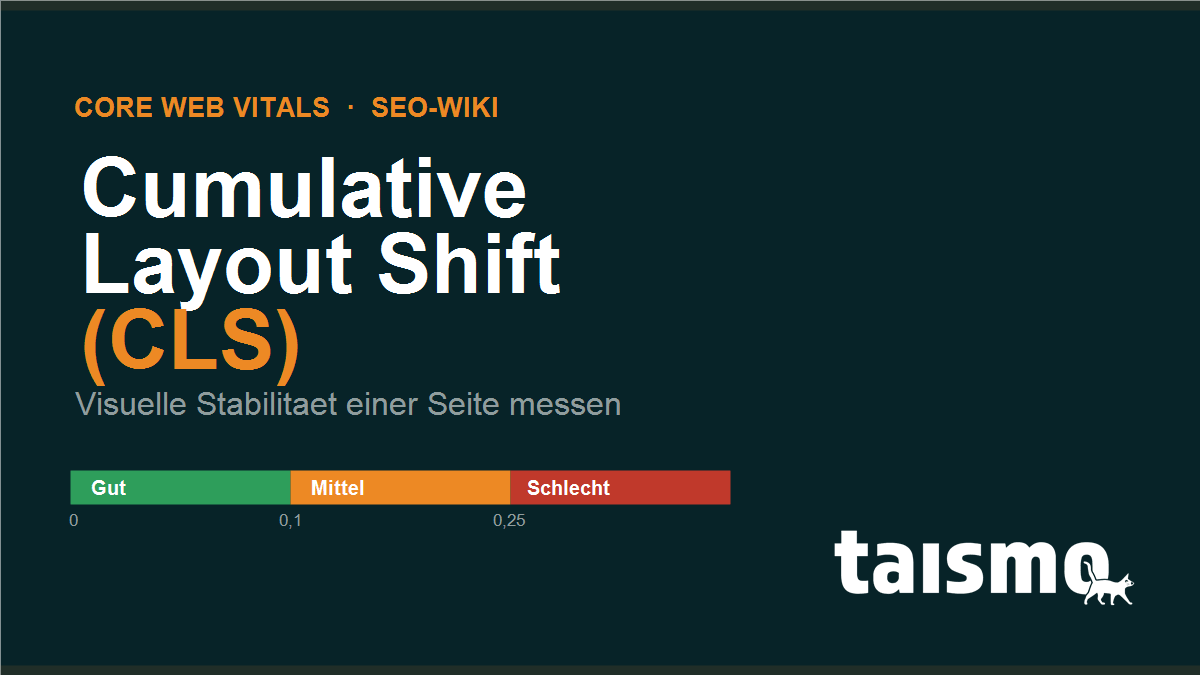
Cumulative Layout Shift (CLS) is one of Google’s three Core Web Vitals and measures the visual stability of a web page. The metric captures how much visible content moves around unexpectedly while the page loads, for example when a late loading image pushes the text you were already reading further down. A CLS value of 0.1 or less counts as good, measured at the 75th percentile of all real page views.
CLS has been one of the official Core Web Vitals since 2021, the set of metrics Google uses to rate the user experience of a page. While Largest Contentful Paint measures loading speed and Interaction to Next Paint measures responsiveness, CLS stands for visual calm: nothing should slide away under the visitor’s finger while the page is still loading.
Cumulative Layout Shift at a glance
Property
Detail
Category
Core Web Vital (field metric for visual stability)
75th percentile of all page views (mobile and desktop rated separately)
Related metrics
Largest Contentful Paint (LCP), Interaction to Next Paint (INP)
What exactly does Cumulative Layout Shift measure?
CLS measures the sum of all unexpected layout shifts that happen over the whole lifetime of a page. A layout shift occurs whenever an element that is already visible changes its position between two rendered frames without the visitor having triggered an action.
The score of every single shift comes from two factors that are multiplied with each other:
Impact fraction: how much of the visible screen is affected by the shift.
Distance fraction: how far the element has moved relative to the viewport.
An element that takes up half the screen height and slides down by a quarter of that height therefore produces a layout shift score of 0.5 × 0.25 = 0.125. One point matters: since 2021, CLS no longer adds up every shift in a session, only the strongest connected burst of shifts (the so called session window). That keeps long lived single page applications from piling up artificially bad values.
Only unexpected shifts count. If content moves as a direct reaction to a click or a key press within 500 milliseconds, the shift is not counted, because the visitor caused it.
What is a good CLS value?
A good CLS value is 0.1 or below. Google splits the scale into three bands: up to 0.1 a page counts as “good”, between 0.1 and 0.25 as “needs improvement” and above 0.25 as “poor”. What decides is neither the best nor the average measurement, it is the 75th percentile, so the value that 75 percent of all real page views reach or beat.
Fig. 1: The CLS rating scale with the thresholds 0.1 and 0.25.
Because the 75th percentile is what counts, it is not enough for the page to load stably on your own fast test device. Google relies on field data from real visitors with different devices and connections. A single jumpy banner on slow smartphones can already push the value past the mark.
What causes layout shifts?
Layout shifts almost always come down to the same thing: the browser has to make room for an element that only arrives later, and it pushes the content it has already rendered out of the way. The most common causes:
Images without size attributes: if width and height (or an aspect-ratio) are missing, the browser only learns the image dimensions while loading and pushes the following content down. The right image format changes nothing about that, what matters is the reserved area.
Ads, embeds and iframes without fixed dimensions: ads, social media embeds or video players load asynchronously and shove existing content aside when no placeholder is defined.
Content loaded in dynamically:cookie banners, newsletter boxes or “related articles” that get inserted through JavaScript above existing content.
Web fonts (FOIT and FOUT): when a font arrives late and the text reflows from the fallback to the target font, line lengths and heights change.
Sloppy lazy loading: images that load late without a reserved area shift the layout at exactly the moment the visitor scrolls.
Fig. 2: A late loading image without reserved space (left) pushes the text away, with fixed dimensions (right) the layout stays stable.
How is CLS measured?
CLS is collected in two ways: through field data from real visitors and through lab tests. Only the field data counts for the Google rating.
Field data: the Chrome User Experience Report (CrUX) collects CLS values anonymously from real Chrome users. This data feeds into PageSpeed Insights and into the Core Web Vitals report of Google Search Console, and it is the basis of the actual rating.
Lab data: tools such as Lighthouse or the Chrome DevTools simulate a single page view under controlled conditions. They are good for tracking down causes, but they do not mirror the real spread of visitors.
JavaScript measurement: the open web-vitals library from Google records CLS directly in the browser and can be wired up to any analytics tool.
One difference is central: lab tools only measure CLS up to the initial load, field data covers the whole session including scrolling and interaction. That is why a Lighthouse score can be green while Search Console reports red.
How do you reduce CLS?
You reduce CLS by telling the browser from the start how much space every element needs. The most effective measures:
Set image and video dimensions: always give width and height (or aspect-ratio in CSS) so that the browser reserves the area in advance.
Reserve space for ads and embeds: define fixed container heights for ads, iframes and dynamic boxes instead of letting them push the content away.
Never insert content above existing content: place banners and notices below the visible content or as an overlay, not on top of it.
Tune your web fonts: use font-display: optional or swap with a matching fallback font and preload the most important font file.
Animate with transform: build movement with transform instead of layout triggering properties such as top or height.
In practice it pays to start with the largest visible elements, because that is where every correction moves the score the most. If you do not know which elements trigger the shift, you find the culprits in the Search Console report or in the “Layout Shift” layer of the Chrome DevTools. A structured technical check of this and the other Core Web Vitals is a fixed part of an SEO audit.
Frequently asked questions about CLS
Is CLS a ranking factor? Yes, CLS is part of the Core Web Vitals and therefore a confirmed, though weak, ranking signal. With comparable relevance a good CLS value can tip the scales, but it does not replace strong content.
Why is my CLS worse on mobile than on desktop? On smartphones the viewport is smaller, so the same shift takes up relatively more of the screen. On top of that, mobile connections load images and ads more slowly, which makes layout shifts more likely.
Does a shift after a click count towards CLS? No, shifts that follow a user action within 500 milliseconds count as expected and do not feed into the CLS value.
Crawl budget is the number of URLs that Googlebot crawls on a website within a given period. It results from two factors: the crawl capacity limit, meaning how many requests a server can handle without slowing down, and the crawl demand, meaning how important and how fresh Google considers the content. For most small websites crawl budget is not an issue. It becomes relevant above all on large websites with many thousands of URLs.
Crawl budget is not a fixed number that Google assigns to a website. It is the result of server performance and demand. The crawler fetches pages, follows links and hands the content on for indexing. The more URLs a website has, the harder those pages compete for the limited number of fetches, and the more a clean approach to crawl budget pays off.
Google determines the crawl budget from two quantities that work together: the crawl capacity limit and the crawl demand. One sets how much can be crawled, the other how much should be crawled.
Crawl capacity limit: the maximum number of parallel connections that Googlebot opens to a website without overloading the server. If the server answers fast and without errors, Google raises the limit. If it turns slow or returns server errors, meaning a 5xx status code, Google throttles crawling automatically.
Crawl demand: how strongly Google wants to crawl a website. It rises with the popularity of the URLs, with their freshness and with how often they change. Popular and frequently updated pages get visited more often, orphaned or static pages less often.
The actual crawl budget is the smaller of the two limits. Even if the server could take a lot more, Google will not crawl beyond what the demand justifies, and a weak server slows crawling down even when demand is high.
Fig. 1: Crawl budget as the result of crawl capacity limit and crawl demand.
How much Google actually crawls on a website can be traced in the Crawl stats report in Google Search Console, including the number of requests per day, the average response time and the status codes that came back.
Who is crawl budget relevant for?
Crawl budget is relevant above all for large websites with very many URLs. Google gives a rule of thumb in its own documentation: only from roughly 10,000 URLs, or with frequently changing content, is it worth steering the crawl budget actively.
Typically affected are:
Large online shops with thousands of product, category and filter pages.
News and publishing sites that put out many new articles every day and depend on fast indexing.
Portals and directories with dynamically generated pages, such as job boards or real estate platforms.
For a typical company website with a few hundred pages, crawl budget is not a bottleneck: Google usually crawls those pages in full. Here the work on content quality and site structure pays off more than crawl control. Even so, whatever spares the crawler almost always improves the technical health of a website as a whole.
What wastes crawl budget?
Crawl budget gets wasted whenever Googlebot spends fetches on URLs that offer no indexable value. Every request to a low value or duplicated page is taken away from the capacity for the pages that really matter.
Fig. 2: Five typical crawl budget wasters that tie Googlebot fetches to unimportant URLs.
The most common causes in detail:
Faceted navigation and URL parameters: filters, sort orders and session IDs create countless URL variants of the same content. In online shops this is the biggest budget eater of all.
Duplicate content: if identical content is reachable through several URLs, Google crawls every variant and burns budget on duplicates.
Soft 404 and error pages: pages that return status 200 but are empty or without substance tie up fetches with nothing in return.
Redirect chains: every extra hop in a chain costs another fetch before the actual page is reached.
Low value and orphaned pages: thin content, endless calendar archives or orphaned pages without internal links lower the overall value of a website and pull demand away from the strong pages.
How do you optimize your crawl budget?
You optimize crawl budget by making the important pages easy to reach for Googlebot and by keeping unimportant URLs out of crawling for good. The goal is that every fetch lands on an indexable, valuable page.
Steer crawling with robots.txt: exclude URLs without search value, such as filter parameters, internal search results or the shopping cart. robots.txt blocks the crawling, not the indexing of URLs that Google already knows.
Steer indexing with noindex and the X-Robots-Tag: if a page should be crawled but not indexed, a noindex as a meta tag or as an HTTP header is the right way. One catch: Google cannot read the noindex on a page that robots.txt blocks.
Keep a clean sitemap: the XML sitemap should hold only indexable, canonical URLs with status code 200. It is the strongest hint to Google about which pages have priority.
Improve server performance: fast response times raise the crawl capacity limit. A quick server, caching and a CDN let Googlebot fetch more pages in the same time, and the same groundwork also shows up in your Core Web Vitals.
Resolve redirect chains: point redirects straight at the final destination instead of routing them through several stops.
Strengthen internal linking: link important pages flat, and either connect orphaned pages or remove them. A clear structure guides the crawler to the content that counts.
Which of these levers matter in a given case shows up in a structured look at the server logs and the crawl stats. That technical inventory is part of a professional SEO audit, which makes crawling waste visible and puts the strongest levers first. More terms around crawling and indexing are collected in the SEO glossary.
Frequently asked questions about crawl budget
Is crawl budget a ranking factor? No, crawl budget is not a direct ranking factor. It only influences how fast and how completely Google crawls and indexes pages. A page that never gets crawled cannot rank either, so sufficient crawling is the precondition for visibility.
Do I have to care about crawl budget on a small website? As a rule, no. Websites with a few hundred up to a few thousand URLs are usually crawled in full by Google. Only from roughly 10,000 URLs, or with very frequent content changes, does active crawl budget management become a topic.
Does a higher crawl frequency improve my ranking? No. More frequent crawling only means that changes reach the index faster. The content itself is judged independently of that, through the actual ranking signals.
Where do I see how much Google crawls on my website? In the Crawl stats report in Google Search Console. It shows the number of crawl requests, the average server response time and the distribution of status codes over time.
Core Web Vitals are three metrics defined by Google that rate the user experience of a web page in technical terms: loading speed, responsiveness and visual stability. The three Core Web Vitals are called Largest Contentful Paint (LCP), Interaction to Next Paint (INP) and Cumulative Layout Shift (CLS). Google measures them on data from real users and uses them as part of the “Page Experience” ranking signal. A page that lands in the green range on all three values counts as fast, usable and stable.
Core Web Vitals turn a vague impression into clear numbers: instead of “the page feels slow” you get a value in seconds for the page build, a value in milliseconds for the reaction to a click and a score for jumpy layouts. That measurability is what makes the Core Web Vitals the central KPI on the technical side of SEO.
Core Web Vitals at a glance
Property
Detail
Word class
noun, plural (the Core Web Vitals)
Pronunciation
“kor web VY-tuhlz”
Syllables
Core Web Vi·tals
Count
3 metrics: LCP, INP, CLS
Related terms
Page Experience, PageSpeed, Lighthouse, CrUX, load time
What are the three Core Web Vitals?
There are exactly 3 Core Web Vitals, and each one measures a different dimension of the user experience. Every metric has fixed thresholds that Google splits into “good”, “needs improvement” and “poor”.
Largest Contentful Paint (LCP), load time. LCP measures how long it takes until the largest visible element in the viewport has loaded, usually an image or a heading. Good is a value of 2.5 seconds or less, poor is anything above 4.0 seconds.
Interaction to Next Paint (INP), responsiveness. INP measures how quickly the page reacts visibly to input such as a click or a tap. Good is a value of 200 milliseconds or less, poor is anything above 500 milliseconds.
Cumulative Layout Shift (CLS), visual stability. CLS measures how much elements move around unexpectedly while the page loads. The value has no unit. Good is a value of 0.1 or less, poor is anything above 0.25.
Fig. 1: The three Core Web Vitals LCP, INP and CLS with the Google thresholds for good, medium and poor.
A value in the yellow range (“needs improvement”) is not enough: Google only counts a page as passed once all three Core Web Vitals sit in the green range.
How are Core Web Vitals measured?
Core Web Vitals are measured in two ways, with field data and with lab data. Each answers a different question.
Field data: anonymous measurements from real Chrome users, collected in the Chrome User Experience Report (CrUX) over 28 days. This is the data that feeds into ranking, because it reflects the real experience.
Lab data: simulated measurements under standardized conditions, for example with Lighthouse. They are reproducible and ideal for debugging, but they do not mirror real devices and networks.
What counts is the 75th percentile: Google does not rate the average, it rates the value that 75 % of users reach or beat. A page only passes when three out of four visitors have a good experience. The most important tools are PageSpeed Insights, the Core Web Vitals report in Google Search Console and the Chrome DevTools.
What happened to FID?
INP has replaced FID. Until March 12, 2024, First Input Delay (FID) was the third Core Web Vitals metric for interactivity. FID only measured the delay of the very first input, not the reaction to later clicks.
Interaction to Next Paint rates all interactions in a session instead and reports the slowest one, rather than just the first contact. That makes INP stricter and closer to how usable a page really is. If you still have older audits with FID in them, collect the values again, because FID has not been a Core Web Vital since 2024.
Why do Core Web Vitals matter for SEO?
Core Web Vitals are a confirmed Google ranking factor, embedded in the “Page Experience” signal. When two pages are similarly relevant, the faster and more stable one can rank better. The effect is not a turbo, it works as a tiebreaker: good content stays the foundation, but weak Core Web Vitals slow it down.
The second lever is conversion. Slow pages and jumping layouts push the bounce rate up, because people give up before the page becomes usable. Fast Core Web Vitals therefore serve two goals at once: visibility in search and the behavior of visitors on the page. That is why these values are a fixed part of every technical SEO audit.
How do you improve the Core Web Vitals?
Each of the three metrics has its own levers. If you want to improve your Core Web Vitals, work on one value at a time instead of optimizing everything at once.
Improve INP: break up long JavaScript tasks, take work off the main thread, remove unnecessary third-party scripts and keep input handlers lean.
Improve CLS: set a fixed width and height (or aspect-ratio) for images and embeds, reserve space for ads and banners, and preload web fonts so that text does not reflow afterwards.
Fig. 2: The most important optimization levers per Core Web Vitals metric. LCP, INP and CLS are handled separately.
Most of these problems can be solved on the technical level without touching the content. Where a theme, the hosting or a plugin drags the values down, ongoing SEO services keep the Core Web Vitals in the green range for good.
Frequently asked questions about Core Web Vitals
How many Core Web Vitals are there? There are 3 Core Web Vitals: Largest Contentful Paint (LCP) for load time, Interaction to Next Paint (INP) for responsiveness and Cumulative Layout Shift (CLS) for visual stability.
Are Core Web Vitals a ranking factor? Yes, Core Web Vitals are part of the Google “Page Experience” signal. The influence is moderate and works above all as a tiebreaker between pages with comparable content.
What is a good LCP value? A good LCP value is 2.5 seconds or below, measured at the 75th percentile of real users. Between 2.5 and 4.0 seconds the value counts as needing improvement, above 4.0 seconds as poor.
Where do I see the Core Web Vitals of my website? You find the Core Web Vitals in PageSpeed Insights, in the Core Web Vitals report of Google Search Console and in the Chrome DevTools. Search Console shows field data from real users, PageSpeed Insights combines field and lab data.
The click through rate (CTR) is a central performance indicator in digital marketing and in search engine optimization. It measures the ratio between the number of clicks on a given link or ad and the number of times that link or ad was shown (impressions). The CTR is often used to judge how effective an online ad campaign is, or how relevant and appealing a search result or an ad is to users.
The CTR carries the most weight in the context of online ad campaigns and search engine results. A high CTR shows that the content or the ad is relevant and appealing to its audience. A low CTR can point the other way: the ad or the content is not compelling enough, or it does not match the audience it reaches.
How do you calculate the CTR?
Calculating the CTR is straightforward and follows this formula:
CTR = (number of clicks / number of impressions) x 100
In this formula, the number of clicks is how often users clicked the link or the ad. The number of impressions is how often that link or ad was shown to a user. The result is multiplied by 100 to express the CTR as a percentage.
What does the CTR say about SEO?
In search engine optimization, the CTR is an important indicator of how well a page or a piece of content matches what users actually searched for. A high CTR in the search results (SERPs) suggests that the title and the meta description of the page are doing their job and give users a reason to click.
A high CTR can also be a signal to search engines that a page is relevant for a particular query, which can translate into a better position in the SERPs. That said, the CTR is only one of many factors search engines weigh when they decide where a page ranks.
Working on the CTR as part of SEO therefore usually means improving titles and meta descriptions so that they speak to your target audience more directly. It also means making sure the page delivers what the title and the description promised. Done properly, this lifts not only the CTR but also the user experience, which in turn can have a positive effect on the SEO performance of the website.
A crawler, also called a web crawler, is a software program used above all by search engines to browse the World Wide Web automatically and build an index. The name describes the way it works: the program moves from link to link through the web and reads one page after the other.
While it works through websites, the crawler analyzes and indexes their content so that search engines can read it faster later on. It lays the groundwork for everything a search engine does afterwards.
How does a web crawler work?
A crawler is programmed for repeating actions and therefore works automatically.
The information it finds while crawling gets assigned to certain categories and is then indexed, which makes it available for retrieval and evaluation. Texts, images and videos are part of that analysis, and so are the links a page contains.
Different types of crawlers
There are many different crawlers. Well known examples are the Googlebot and the Bingbot, and Alexa Internet ran a bot of its own called ia_archiver.
Crawlers can also carry out other tasks, such as data mining. The web is then searched for specific pieces of information, email addresses for example. Black hat SEOs use this in part to send spam mail to the addresses they collect.
Another field of work is plagiarism detection. That function matters above all when copyrighted material is involved.
How to control a crawler
With meta tags you give the crawler instructions in the head area of a page. Among other things you control whether the crawler indexes a page or follows a link.
This is what an instruction looks like that keeps the address out of the index and stops the crawler from following the links on it:
<meta name="robots" content="noindex,nofollow">
The noindex part of it works exactly like the noindex attribute on any other page. Instructions can be passed to the crawler through the robots.txt file as well.
Crawlers and SEO
Part of search engine optimization is building a website so that the crawler can read it as completely as possible, so that all content ends up in the index of the search engine. A logical URL structure helps here. On top of that, backlinks and clear internal linking lead to the crawler visiting your website more often and staying longer.
Whether crawlers actually get through your pages is one of the questions a technical SEO audit answers. The SEO glossary covers the terms around indexing that go with this one.
Cornerstone content is the essential content of a website that acts as the foundation of an entire content strategy in online marketing. Content of this kind stands out through high quality, comprehensive information and relevance for the core audience. It gives a deep look at specific topics and is usually longer and more detailed than a regular blog post or article. The aim of cornerstone content is to be the central place to go for certain key topics, and to carry high value for visitors and for search engines alike.
Examples of cornerstone content
Comprehensive guides: thorough instructions on one topic, such as “The ultimate guide to social media marketing”.
Foundational explainers: articles that lay out the basic concepts of a field, such as “The basics of search engine optimization“.
Knowledge resources: collections of resources or tools that matter for a topic, such as “Top tools for digital marketing”.
Case studies and research results: detailed analysis of projects or research that opens up specific aspects of a topic, such as “Case study on raising the conversion rate”.
What influence does cornerstone content have on SEO?
Cornerstone content plays an essential part in the search engine optimization (SEO) of a website. Pages that deliver deep, high quality content are often seen as an authority in their field, and that can lead to higher visibility in search engines. On top of that:
Better keyword positioning: because cornerstone content is comprehensive, it can rank for a whole range of relevant keywords.
Longer time on the page: high quality content keeps visitors reading, which counts as a positive signal for search engines.
Backlink magnet: content worth citing attracts natural backlinks, which raises domain authority and improves rankings.
Structure for the website: cornerstone content helps you build a clear structure and shows search engines which content on the site matters most.
A cookie banner is a notice or a popup window on a website that informs visitors that the site uses cookies and comparable technologies. Cookies are small files stored on a visitor’s computer when they open a website. They can hold all kinds of information, from simple settings and preferences through to tracking data that follows behavior on the website and beyond it.
The main purpose of the cookie banner is to give visitors transparency about the use of cookies and to obtain their consent for certain types of cookies, above all for those that can track online behavior.
Which websites need a cookie banner?
In theory every website that uses cookies benefits from a cookie banner, because it creates transparency and trust. In legal terms a cookie banner is often required as soon as the website collects or processes personal data of people in the European Union (EU) or the European Economic Area (EEA).
This is governed above all by the EU General Data Protection Regulation (GDPR), which sets strict rules for handling the personal data of EU citizens. So if a website has visitors from the EU and uses cookies that collect or process personal data, a cookie banner is needed in most cases.
Is a cookie banner mandatory only in Germany?
The obligation to use a cookie banner is governed by the GDPR across the whole EU. That means all EU member states, Germany included, have to follow this rule. On top of that, many other countries around the world have introduced comparable data protection laws that require a cookie banner or recommend one.
Does a cookie banner affect SEO?
A cookie banner in itself has no direct influence on the search engine optimization of a website. It does not affect how crawlable a page is or how search engines interpret the content. It can, however, have indirect effects on the experience people have on your site. An intrusive or disruptive cookie banner can put visitors off or get in the way of usability, which in turn can show up in your bounce rate. Since search engines, and Google in particular, put the focus on user experience, that could potentially affect your SEO work. So it matters that a cookie banner is built to be informative but not disruptive.
Whether your consent solution gets in the way of visitors or of search engines is one of the points we look at in an SEO audit.
A conversion is a desired action that a visitor completes, for example a purchase, a download, a call or a form submission. Conversions are recorded when someone interacts with your website or your ad, with a click for instance, and then carries out that action. They are the goal of a website or of an advertising campaign.
What is conversion tracking?
Conversion tracking measures how often defined goals are completed. There are several ways to measure that success, so it pays to set the goals before you start.
Examples:
Online shoe shop: how many visitors put a pair of shoes in the cart, and how many of them finish the checkout with an order?
App maker: how many visitors go on to download the app in the store or buy something inside the app?
Why should you run conversion tracking?
There are several reasons why conversion tracking is worth the setup:
It measures the success of a website or a campaign, which gives you a solid basis for deciding on advertising budgets and other online marketing measures.
It tells you which campaigns, ads or keywords lead to customer interaction most often, and where there is still room for improvement.
It shows you which sources, media and devices perform best.
Macro vs. micro conversions
Micro conversions are the interactions of a customer that signal interest in the product or the service while the person is not ready to buy yet. Subscribing to an online catalog or downloading a PDF with more detail about the product are typical examples, and they belong to the earlier stages of the sales funnel.
Macro conversions are the interactions where a purchase actually happens.
Micro conversion tracking matters most for products and services that are expensive or have long term effects. The decision process runs longer there, so you need a more detailed picture of which ads or keywords drove the purchase or the continued interest.
Content marketing is a strategic marketing method that creates and distributes relevant, valuable content in order to attract a defined target audience, engage it and finally move it toward an action that is profitable for a company. Unlike traditional advertising, which aims straight at the sale, content marketing focuses on building relationships with potential customers by offering them useful information or entertainment that speaks to their interests or their needs. The approach rests on the assumption that consistent, high quality content raises trust and credibility with an audience and, over time, encourages people to do business with the company.
Concrete examples of content marketing
A classic example of content marketing is a company blog that regularly publishes articles on topics the customers of that company care about. Those articles might offer solutions to common problems, give insight into industry trends or contain useful how-to guides. Other examples include:
Infographics that present complex data or statistics in a visually appealing format.
Videos with tutorials, product reviews or a look behind the scenes.
E-books and white papers that offer in-depth insight into a topic.
Podcasts with discussions or interviews on relevant topics.
Social media posts that encourage interaction and engagement.
Is content marketing important for your online marketing strategy?
Content marketing is an indispensable part of a successful online marketing strategy. It does not only support your SEO work by supplying fresh, search-optimized content on a regular basis, it also raises your visibility on social media and builds a long-term relationship with your target audience. Good content can increase brand awareness, improve brand positioning and strengthen the credibility of and the trust in a brand. On top of that it is a cost-effective way to generate leads and convert them, because it speaks to an audience on a deeper, more personal level. In a world driven by information, content marketing is decisive if you want to stand out and build a strong online presence.