Test Structured Data: 4 Tools for Schema Markup and AI Readability


Dominik is the founder and managing director of taismo, an SEO and GEO agency from Munich. He has worked in search marketing since 2010 and focuses on ongoing SEO support and visibility in AI answers, for companies in Germany and for international firms that want to be found in the German market.
To test structured data, use four tools that each answer a different question: Google’s Rich Results Test shows which rich results a page qualifies for. The Schema Markup Validator checks syntax against the full schema.org vocabulary. Google Search Console reports errors across your whole site. A browser extension shows the schema graph inside the open tab, including pages behind a login. For AI search, two more checks matter: The markup has to sit in the HTML your server sends, and it has to match the visible text.
👉 Want to know how readable your whole site is for Google and AI assistants? Run the free AI visibility checker
Disclosure: This guide is published in the SEO Magazine of taismo, an SEO and GEO agency from Munich. One of the tools covered here, the GEO & Schema Checker, is ours. That is why every statement about the tools comes with a source and a date.
Testing structured data means answering five questions
Structured data is machine-readable information in a page’s source code. It tells search engines and AI systems explicitly what a page contains, for example an article, a product, an event, a company or a person. The vocabulary comes from Schema.org, a joint project started by Google, Microsoft, Yahoo and Yandex. Version 30.1 from September 2026 contains 826 types and 1,540 properties. Google recommends JSON-LD as the format and also supports Microdata and RDFa.
A complete test answers five questions, and each one needs its own tool:
- Syntax: Can the code be parsed as valid JSON-LD, Microdata or RDFa?
- Vocabulary: Do the types and properties exist in schema.org?
- Google eligibility: Does the markup include every required property for a rich result in Google Search?
- Connections: Do the nodes form one graph through their
@id, and does the markup match the visible content? - AI readability: Are search engines and AI systems allowed to fetch the page, and is the markup in the HTML without JavaScript?
The popular testing tools answer questions 1 to 3 reliably. Questions 4 and 5 need a look at the whole page. Google says so in its own guidelines: The quality guidelines for structured data “are not easily testable using an automated tool.” The most important of them is simple: Markup describes only what visitors can see on the page.
The Rich Results Test shows what Google can turn into a rich result
The Rich Results Test is Google’s own testing tool for structured data. You enter a URL or a code snippet, and Google lists the rich result types it found, whether they are valid and which errors or warnings exist. Google recommends starting every test here and then using the Schema Markup Validator for generic schema validation.
What the Rich Results Test reports
- Detected rich results: For example articles, product snippets, breadcrumbs, events or recipes, each marked valid or invalid.
- Errors and warnings: An error concerns a required property and rules out the rich result. A warning concerns a recommended property; the rich result stays possible.
- Rendered page: By default the test loads the page with Google’s smartphone crawler, runs JavaScript and evaluates the rendered HTML.
- Preview: For some types the test shows how the result can look in Google Search.
What the Rich Results Test is built for
The Rich Results Test answers one question very precisely: Can Google create a rich result from this markup? Three properties follow from that:
- Focus on Google types: The test detects the rich result types Google supports in Search. A correct
DefinedTermmarkup for a glossary does not appear as a separate item. - Public pages: Every resource on the page must be accessible to an anonymous user. For pages behind a login or blocked by robots.txt, use the code tab.
- No display promise: Google does not guarantee a rich result, even when the test rates the markup as valid.
Google also trims its list of rich results regularly. Since August 2023, FAQ rich results appear only for well-known, authoritative government and health websites, and HowTo results disappeared completely in September 2023. In June 2025, Google phased out seven more features, including course info, fact checks and estimated salary. Google adds that “structured data that’s not being used does not cause problems for Search” and that using these types outside Google Search is not affected. A missing rich result is therefore no proof of broken markup. What rich results do on the results page is explained in our glossary entry on rich snippets.
Test drafts before they go live: Open the preview in your browser, copy the source code and paste it into the “Code” tab of the Rich Results Test. If your page adds JSON-LD with JavaScript, copy the rendered HTML from your browser’s developer tools.
The Schema Markup Validator replaced Google’s Structured Data Testing Tool
The Schema Markup Validator at validator.schema.org checks whether structured data is syntactically correct and follows schema.org. It works with every type in the vocabulary and shows no Google-specific warnings. You can test a URL or code, and the result lists every detected item with all of its properties.
From Structured Data Testing Tool to Schema Markup Validator
Many searches still ask for the “structured data testing tool.” Google’s tool with that name existed until 2021. On December 15, 2020, Google announced that it would hand the tool over to the schema.org community and refocus it on syntax and schema.org compliance. Since May 2021 it has run as the Schema Markup Validator on its own domain, and since August 2021 the old address has redirected to a page that helps you pick the right tool. The division of labor has been clear ever since: The Rich Results Test checks Google’s rich results, the validator checks the vocabulary.
When the validator is the better choice
The validator is the right tool for every type Google does not use for a rich result. Google itself names ExercisePlan as an example. In practice that covers four cases:
- Entity markup: An organization with profiles, identifiers and founder, a person with credentials and employer
- Terms:
DefinedTermandDefinedTermSetfor glossaries and knowledge bases - Works and software:
Book,SoftwareApplicationandCreativeWork - Retired rich results: For example course info or fact checks, whose use outside Google Search is not affected according to Google
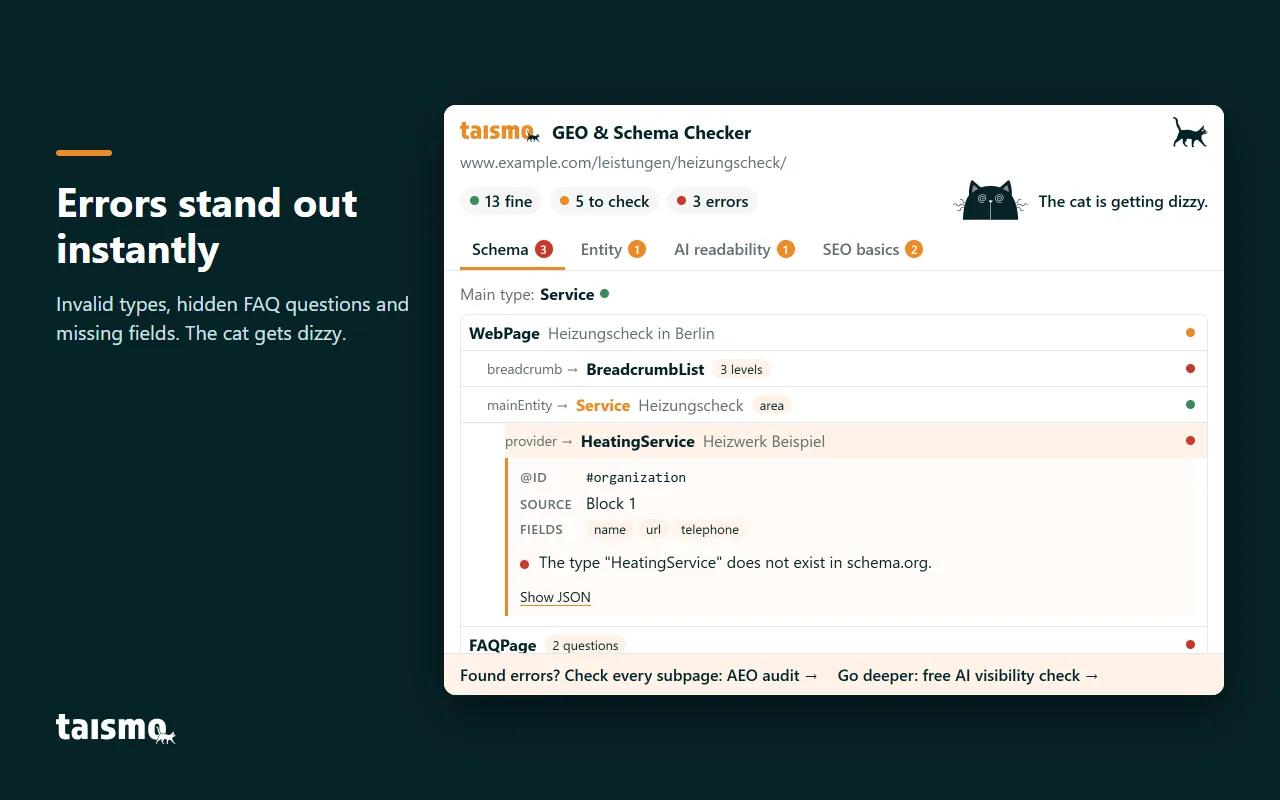
We tested the validator on October 7, 2026 with a test page. An invented type like HeatingService shows up as an “invalid item type” error. Whether Google displays a rich result is something you check afterwards in the Rich Results Test; whether markup and visible text match is something you check against the page itself.
Search Console reports structured data errors across your site
Google Search Console shows how Google actually processed the structured data on your site. Under “Enhancements” there is a separate report for each rich result type Google finds on your site, with valid and invalid items over time. Reports for product snippets and merchant listings sit under “Shopping.”
Three details help you read these reports:
- Items, not pages: The numbers count items. A page with three products produces three items.
- Sample: The reports show a sample of the detected items, and the example table is capped at 1,000 rows.
- After the crawl: An error appears once Google has crawled the page again. After a fix, start a new check with “Validate fix.”
URL Inspection compares the indexed and the live version
For a single URL, the URL Inspection tool in Search Console is the most precise option. It shows two versions. The indexed version contains every enhancement Google found during the last indexing; “Test live URL” shows the current state. “View tested page” shows the rendered HTML, a screenshot, the HTTP headers and the JavaScript console output. That way you see whether markup added with JavaScript really reaches Google.
Search Console only covers sites you have verified; for other sites, use the testing tools or a browser extension.
Testing schema on staging sites and pages behind a login
The online tools fetch pages as an anonymous visitor. Staging systems, password-protected previews and intranets are out of their reach unless you paste the code by hand. A browser extension reads the page in your own browser, the way you see it right now, with your login and after JavaScript has run. One click is enough, and you do not have to copy a URL.
The Chrome Web Store offers four kinds of schema extensions. User numbers are taken from the store on October 7, 2026:
| Kind | Example | What the extension does |
|---|---|---|
| Hand-off to Google | “Rich Results: Structured Data Test Plugin,” about 5,000 users | sends the open URL to the Rich Results Test in one click |
| Display and validation | “Fast Schema Markup Checker” by Vryse, about 10,000 users | finds the schema markup on the page and validates it |
| Visualization | “SEO Schema Visualizer,” about 8,000 users | shows JSON-LD as an interactive graph |
| Creation | “Schema Builder for Structured Data” by Schema.dev, about 40,000 users | creates JSON-LD with point-and-click forms |
The right extension depends on the job. If you write markup, you need a builder. If you want to see what a page delivers, how its nodes connect and whether AI systems can read it, you need a display with a graph and a page comparison. That is the job we built the GEO & Schema Checker for Chrome for, which we introduce further down.
The schema graph shows how nodes connect through @id
Many pages deliver more than one JSON-LD block. An SEO plugin creates the basics for page, site and breadcrumbs, the theme adds a logo, and a custom block describes article, author and company. According to the W3C JSON-LD standard, @id uniquely identifies a node. Nodes with the same @id therefore describe the same thing, and tools that evaluate the graph merge them into one node.
References are created when a node names only the @id of another node. In this snippet the article points to its author and its company without describing them again:
{
  "@context": "https://schema.org",
  "@graph": [
    {
      "@type": "BlogPosting",
      "@id": "https://www.example.com/blog/heat-pump-check/#article",
      "headline": "Heat Pump Check: Process, Duration and Cost",
      "author": { "@id": "https://www.example.com/#person-lena-muster" },
      "publisher": { "@id": "https://www.example.com/#organization" }
    },
    {
      "@type": "Organization",
      "@id": "https://www.example.com/#organization",
      "name": "Example Heating Inc."
    }
  ]
}
The Schema Markup Validator resolves these references. In our test on October 7, 2026, it merged two blocks with the same organization @id into one node with name and phone number, and it showed the article nested under the page. If a node points to an @id that is described nowhere on the page, the validator shows an empty “Thing” without an error message. Whether that is an intended reference to a sitewide entity or a typo is up to you to decide.
When you check the graph, look at three points:
- Every reference finds its target: A referenced
@idis described on the same page or is a clearly defined sitewide entity, such as the company on the homepage. - Every entity has exactly one
@id: If three blocks describe the same company with three different@idvalues, the graph contains three companies. - Every list has one source: If a plugin and a custom block both deliver a
BreadcrumbListunder the same@id, the entries mix.
A clean graph helps search engines and AI systems assign a page to one entity: Article, author and company are explicitly connected. Which types fit which case and how to ship them is covered in our guide to schema markup in practice.
8 common structured data errors and the tool that finds each one
Most structured data errors come from several sources working on the same page or from later changes. The table lists eight common errors, how to spot them and which tool reveals them:
| Error | How to spot it | Tool that shows it |
|---|---|---|
| Invented type | A type like “HeatingService” that exists in no schema.org list | Schema Markup Validator, browser extension |
| Missing required property | A breadcrumb list without a URL in an intermediate step, a product without a name | Rich Results Test, Search Console |
| Hidden FAQ | Questions appear in the markup but not on the page | Comparison with the visible page, browser extension with page comparison |
| Two sources, one list | A plugin and a custom block deliver a BreadcrumbList under the same @id |
Search Console, graph view |
| Duplicate entity | The company appears three times with different @id values |
Graph view |
| Dead reference | An @id with a typo points to a node that does not exist |
Graph view, validator (empty “Thing”) |
| Conflicting facts | Phone number, address or price in the markup differ from the visible text | Comparison with the visible page |
| Markup only via JavaScript | The JSON-LD is missing from the source code and appears only after rendering | Source without JavaScript, URL Inspection |
“Hidden FAQ” and “Conflicting facts” weigh the most, because they break Google’s quality guidelines. Google is explicit: “Don’t mark up content that is not visible to readers of the page.” A violation can lead to a manual action. The page can then no longer appear as a rich result, while its ranking in web search stays unaffected according to Google. Conflicting information also makes a source harder to classify for search engines and AI systems. Phone number and address therefore belong in the markup, the legal notice and every profile in identical form, as described in our glossary entry on NAP consistency.
AI readability: What AI search can actually read
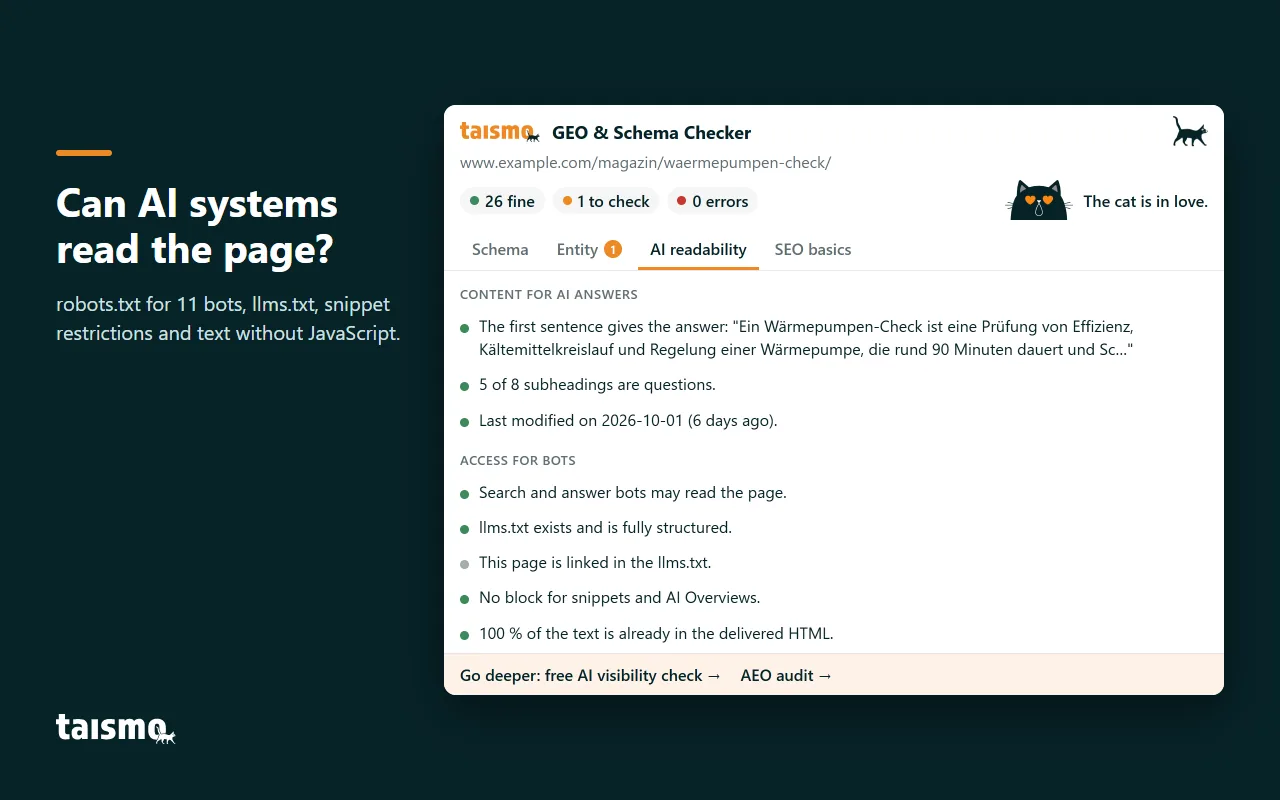
AI readability describes whether AI systems can fetch a page, understand it and use it as a source. It is the technical base of AI search optimization, also called answer engine optimization (AEO) or generative engine optimization (GEO). For the AI features in Google Search, AI Overviews and AI Mode, Google lists no extra requirements: A page has to be indexed and eligible for a snippet. Google explicitly does not ask for special schema.org markup or AI text files. One rule, however, Google spells out: Make sure “your structured data matches the visible text on the page.”
Other AI systems fetch pages with their own crawlers. An analysis by Vercel from December 2024 reached a clear result: None of the major AI crawlers render JavaScript. That applies to the crawlers of OpenAI (GPTBot, OAI-SearchBot, ChatGPT-User), Anthropic (ClaudeBot), Meta, ByteDance and Perplexity. Gemini uses Googlebot’s infrastructure and renders JavaScript completely. Content that is already in the initial HTML response, including JSON data, can still be used by AI models according to Vercel.
Four checks for AI readability
- Markup in the server HTML: Open the source code, in Chrome with Ctrl+U, and search for
application/ld+json. Whatever is missing there and appears only after a tag manager runs stays invisible to many AI crawlers. Google processes markup generated with JavaScript, but points out for product data that Shopping crawls can then happen less frequently and less reliably. - Access in robots.txt: Check which bots your robots.txt allows. Search crawlers like OAI-SearchBot fetch pages for answers, training crawlers like GPTBot and ClaudeBot collect data for models, and Google-Extended controls use for training and grounding in Gemini. Our guide on controlling GPTBot and other AI crawlers shows how to manage each of them.
- Snippet controls: The rules
nosnippet,data-nosnippet,max-snippetandnoindexlimit, according to Google, which information from a page appears in Google Search, including the AI features. These rules live in the HTML or as an X-Robots-Tag in the HTTP header. A control set by mistake removes a page from AI Overviews. - llms.txt: This optional file in the root directory summarizes the most important content of a site for AI systems. Google says it does not need it; whether another AI system reads it is up to each provider. More in our llms.txt guide.
The text matters too: Sections that answer a question in their first sentence are easier to use as a source. How structured data, entity and content work together for visibility in AI answers is described on our page about AEO and GEO services.
The taismo GEO audit reviews entity, structured data and machine discoverability across your whole site and delivers the fixes in the right order.
Structured data testing tools compared
Each tool covers different levels. The table maps the tools to the five levels from Figure 1:
| Tool | Answers | Checks | Pages behind a login | Cost |
|---|---|---|---|---|
| Rich Results Test | Syntax and Google eligibility (1, 3) | one URL or code | via the code tab | free |
| Schema Markup Validator | Syntax and vocabulary (1, 2) | one URL or code | via code | free |
| Search Console reports | Google eligibility after the crawl (3) | your whole site, as a sample | no | free |
| URL Inspection | Indexed and live version (3) | one URL of your own site | no | free |
| Browser extensions | Depends on the extension (1, 2, 4) | the open page | yes | mostly free |
| GEO & Schema Checker | Syntax, types, graph, entity and AI readability (1, 2, 4, 5) | the open page | yes | free |
In short: For Google’s rich results the Rich Results Test is the reference, for the vocabulary the validator and for your whole site Search Console. A browser extension adds the view of a single page in context, even before it goes live.
GEO & Schema Checker: Schema graph, entity and AI readability in one click
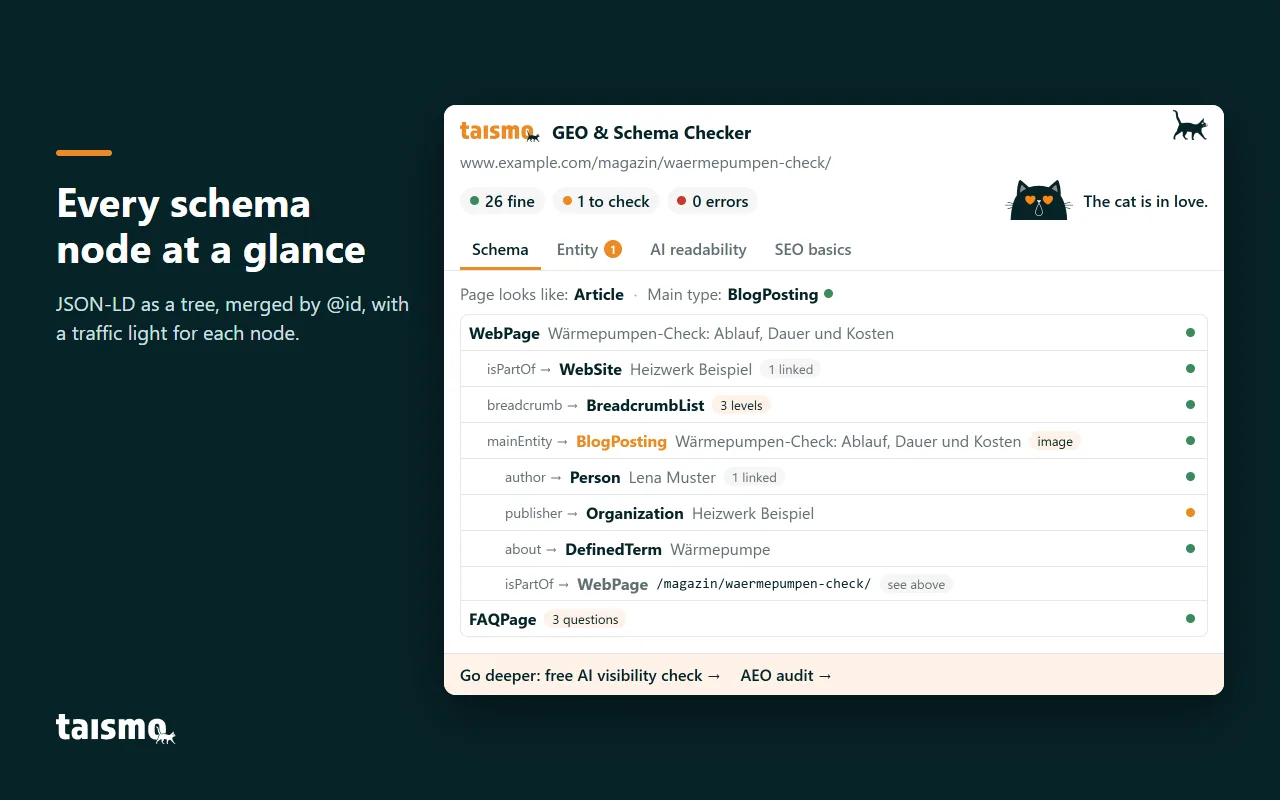
The GEO & Schema Checker is a free Chrome extension by taismo. It checks the open page in four tabs and rates each finding with a three-step traffic light, from “passes” to “check” to “error.”
- Schema: All JSON-LD blocks as a tree, merged by
@id, with main type and a rating for each node. - Entity: Organization and author, references to knowledge bases such as Wikidata, identifiers and profiles, plus a comparison of name, phone number and address between markup and page.
- AI readability: Answer in the first sentence, question headings, freshness, robots.txt for 11 search and AI bots, llms.txt, snippet controls and text without JavaScript.
- SEO basics: Title, description, canonical, indexability, Open Graph, sitemap, hreflang and every heading from H1 to H6.
The check runs entirely in your browser. The extension sends no data to taismo or third parties, needs no account and only accesses the tab you are checking. It fetches files from the checked site only, such as its robots.txt and llms.txt. That is why it also works on pages behind a login and on previews that are not published yet. For a detailed check, every node links straight to the Rich Results Test and the Schema Markup Validator.
You can install the checker for free from the Chrome Web Store. It also runs in other browsers that install Chrome extensions, such as Microsoft Edge and Brave. It always checks the page that is open; how readable your entire site is for search engines and AI systems is shown by the free AI visibility checker. We built the checker for our own work, because taismo is an SEO and GEO agency from Munich that implements structured data and AI visibility for companies.
A 6-step routine to test structured data
The tools deliver the most value in the right order. This routine covers all five levels:
- Step 1: Check the preview. Before launch, check the page with a browser extension or paste the source into the code tab of the Rich Results Test.
- Step 2: Test rich results. After launch, run the URL through the Rich Results Test and fix errors in required properties right away.
- Step 3: Validate the vocabulary. Check types without a rich result, such as organization, person or glossary terms, in the Schema Markup Validator.
- Step 4: Compare graph and page. Check that every
@idreference has a target, every entity has exactly one@idand FAQs, prices, phone number and address in the markup match the visible text. - Step 5: Check AI readability. Review the source without JavaScript, the robots.txt and the snippet controls.
- Step 6: Watch Search Console. Review the reports under “Enhancements” once a month and start “Validate fix” after every correction.
Repeat steps 2 to 5 after every update to your theme, SEO plugin or page template, because a single update can change the markup on every page of a type. During a migration, structured data belongs on the website migration checklist, before and after the switch. If you need the test as part of a complete site review, you will find it in the SEO audit by taismo.
Pick one reference URL per page template, for example a blog post, a service page and a product. After an update you test only those three pages and see right away whether the markup of every page of that type has changed.
We build and test structured data for your site, from the schema graph to the entity. Tell us about your project.
FAQ about testing structured data
How do I test structured data?
Enter the URL in Google’s Rich Results Test to see which rich results the page qualifies for, then run it through the Schema Markup Validator to check the full schema.org vocabulary. For your whole site, use the enhancement reports in Google Search Console.
How can I check if my schema markup is working?
The Rich Results Test shows whether Google detects your markup and whether it is valid, and the URL Inspection tool in Search Console shows what Google found in the indexed version. Valid markup is still no guarantee that Google displays a rich result.
Does FAQ schema still work?
FAQPage markup is still valid schema.org, but since August 2023 Google shows FAQ rich results only for well-known, authoritative government and health websites. Google states that structured data that is not being used does not cause problems for Search.
How do I check schema markup on a staging site?
Paste the page source into the code tab of the Rich Results Test or the Schema Markup Validator, or use a browser extension, which reads the page in your own logged-in session.
Does AI search work better with structured data?
Google applies the same rules to AI Overviews and AI Mode as to Search in general and requires structured data to match the visible text. Other AI providers do not disclose how much they use JSON-LD, so the markup should sit in the server HTML and repeat what the page says.
Sources
- Google Search Central: “Schema Markup Testing Tools“, Google, retrieved October 7, 2026.
- Google Search Console Help: “Rich Results Test“, Google, retrieved October 7, 2026.
- Ryan Levering, Google Search Central Blog: “Test your structured data with the Rich Results Test and Schema Markup Validator“, Google, December 15, 2020, updated May 11 and August 9, 2021.
- Google Search Central: “General structured data guidelines“, Google, retrieved October 7, 2026.
- Google Search Central Blog: “Changes to HowTo and FAQ rich results“, Google, August 8, 2023, updated September 14, 2023.
- Henry Hsu, Google Search Central Blog: “Simplifying the search results page“, Google, June 12, 2025.
- Google Search Console Help: “Rich result status reports“, Google, retrieved October 7, 2026.
- Google Search Console Help: “URL Inspection tool“, Google, retrieved October 7, 2026.
- Google Search Central: “AI features and your website“, Google, retrieved October 7, 2026.
- Google Search Central: “Generate structured data with JavaScript“, Google, retrieved October 7, 2026.
- Giacomo Zecchini, Alice Alexandra Moore, Malte Ubl, Ryan Siddle: “The rise of the AI crawler“, Vercel, December 17, 2024.
- Schema.org: “Schemas (version 30.1)“, schema.org, retrieved October 7, 2026.
- W3C: “JSON-LD 1.1: Node Identifiers“, World Wide Web Consortium, July 16, 2020.
- Chrome Web Store: “Rich Results: Structured Data Test Plugin“, Google, retrieved October 7, 2026.
- Chrome Web Store: “Fast Schema Markup Checker by Vryse SEO“, Google, retrieved October 7, 2026.
- Chrome Web Store: “SEO Schema Visualizer“, Google, retrieved October 7, 2026.
- Chrome Web Store: “Schema Builder for Structured Data“, Google, retrieved October 7, 2026.