Generative Engine Optimization (GEO) is the optimization of content and entities so that generative AI systems such as ChatGPT, Google Gemini, Perplexity and the Google AI Overviews take them into account and cite them. GEO carries the principles of search engine optimization (SEO) over to AI-driven search.
How does GEO work?
GEO makes sure that AI systems recognize a brand, a product or a term as a clear entity, assign facts to it unambiguously and take those facts on as a trustworthy source. Three building blocks sit at the center: a declarative, fact-driven way of writing (every paragraph answers one question on its own), cleanly marked-up entities and structured data via JSON-LD. That lets an AI system pull the statements straight into its answer during the retrieval step (grounding). The central role in that step belongs to the grounding page.
What is the difference between GEO and SEO?
SEO optimizes how easy a page is to find in classic search results. GEO optimizes whether entities and statements are taken into account in AI answers. Both work on the same content but judge it by different criteria. At taismo, GEO is therefore not a separate product but a part of modern SEO. We explain why we see it that way in our article on GEO vs. SEO.
What matters in GEO?
Fig. 1: The four building blocks of Generative Engine Optimization.
Declarative writing: clear statements following the definition pattern “X is …”, with every paragraph as a self-contained, quotable chunk.
Entities: consistent naming of brand, person and product, connected through sameAs.
Structured data (JSON-LD): marking facts up so that machines can read them (for example structured data types such as Organization or DefinedTerm).
E-E-A-T in a transferred sense: AI systems prefer verifiable, consistent sources with recognizable experience, expertise and authority.
Consistency across sources: the same facts on the website, in business directories and on profiles.
Who is GEO relevant for?
GEO is relevant for every company that wants to stay visible in AI-driven search. Since more and more users put their questions straight to ChatGPT, Gemini or Perplexity, GEO helps decide whether a brand shows up in those answers at all. In our SEO services we therefore treat GEO as a fixed part of ongoing optimization.
A grounding page is a single, authoritative and machine-readable web page that serves as a citable source of truth for exactly one entity or one topic. AI systems such as ChatGPT, Google Gemini, Perplexity and the Google AI Overviews reach for it during the grounding step, to back their answers with facts they can point to.
What does grounding mean in AI systems?
Grounding is the technical step in which a language model ties its answer to external, verifiable sources. Instead of answering from its training knowledge alone, the system retrieves current passages of text during the grounding step and uses them as evidence. One point is decisive: the AI is not looking for a link to click, it is looking for a passage of text (a chunk) that it can take straight into its answer. Three factors carry the most weight: semantic fit, information density and factual accuracy.
How does a grounding page differ from a classic SEO page?
A classic SEO page is optimized for click probability and rankings. A grounding page is optimized for citability. Both work with the same content, but they judge it by different criteria:
Feature
Classic SEO page
Grounding page
Goal
click and ranking
citation in the AI answer
Judged by
relevance and authority for the click
semantic fit, information density, factual accuracy
Unit
the whole page or URL
the single passage of text (chunk)
Success
position in the search results
mention as a source in ChatGPT, Gemini, Perplexity
Fig. 1: A classic SEO page and a grounding page judge the same content by different criteria.
A grounding page is therefore the machine-readable evolution of the classic “about us” or definition page: built consistently for entity clarity that machines can read.
What makes a good grounding page?
A grounding page meets five requirements:
One topic, one entity: the page covers exactly one term, one brand or one person, with no mixture of topics.
Self-contained, citable chunks: every paragraph answers one question in full and without the context of the rest, following the definition pattern “X is …”.
Machine-readable structure:structured data in JSON-LD (for example DefinedTerm) makes the entity and its facts explicit.
Factual accuracy and freshness: concrete numbers, dates and a visible update date instead of vague statements.
Consistency across sources: the name, the facts and the details match on every platform, connected through sameAs. That pays straight into E-E-A-T.
How do you build a grounding page?
Building one follows five steps:
Step 1: define the entity and put the core fact into one single sentence.
Step 2: answer the logical follow-up questions in sections of their own, each one a self-contained chunk.
Step 3: add structured data: DefinedTerm for terms, Organization for companies.
Step 4: mirror the facts consistently on external platforms and connect them through sameAs.
Step 5: keep it current: update the date and the numbers on a regular basis.
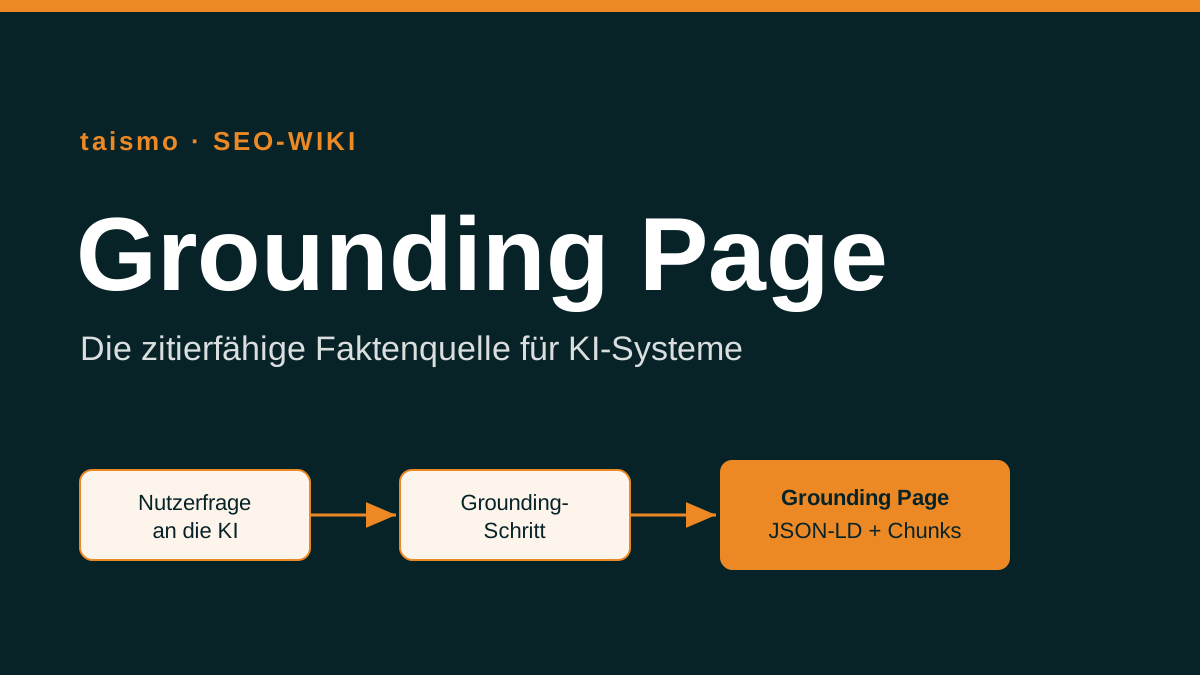
Fig. 2: The grounding flow, from the user question through the retrieval step to the sourced AI answer.
Grounding page and GEO: how do they connect?
Grounding pages are one building block of Generative Engine Optimization (GEO). GEO steers how entities, sources and meanings are picked up in AI answers. The grounding page delivers the citable base of facts for that, while GEO organizes how those facts spread and connect across many sources. Anyone who wants to be visible in ChatGPT, Gemini or Perplexity needs both: clean grounding pages and a consistent entity structure around them. That is the work behind our GEO services, and semantic SEO provides the editorial groundwork for it.
Frequently asked questions about grounding pages
Does every website need a grounding page?
Not every single page, but every important entity. For your brand, your core service and your central technical terms, one grounding page each is worth it, so that AI systems can assign and cite these entities without ambiguity.
Is a grounding page the same as a landing page?
No. A landing page aims at conversion and clicks, a grounding page aims at citability in AI systems. Both can exist side by side and follow different goals.
Which structured data belongs on a grounding page?
Depending on the type, DefinedTerm (term), Organization (brand) or Article, always with explicit, machine-readable facts and consistent sameAs connections.
gzip (GNU zip) is a widely used compression program and file format that is applied above all on the web to reduce the file size of web content such as HTML, CSS and JavaScript files. Developed by Jean-loup Gailly and Mark Adler in 1992, it has become the standard for file compression on the internet.
gzip uses the DEFLATE algorithm, a combination of the LZ77 algorithm and Huffman coding, to compress data efficiently. Thanks to gzip compression, web servers can send content to the browser in a smaller format, which shortens the loading times of a page significantly, because less data has to travel across the internet.
How do I enable gzip on my website?
How you enable gzip depends on the web server you use. For the two most common web servers, Apache and Nginx, there are specific configurations.
Apache: with Apache, gzip is enabled through the module mod_deflate. This module lets the server compress content before it is sent. To switch it on, edit the .htaccess file of your website or the main configuration file of the Apache server and add the following code:
With these configurations in place, the server compresses the file types listed automatically before they go out to the browser.
Is gzip outdated?
Although gzip has been around for more than three decades, it is not outdated. It remains an efficient and widely used way to reduce the size of web content. Modern alternatives such as Brotli, which was developed by Google, offer a better compression ratio than gzip and are supported by more and more modern browsers. Brotli is particularly effective at compressing text files and can improve loading times further. Even so, not every browser and not every web server supports Brotli, which makes gzip a reliable and compatible choice for website optimization. In practice it is recommended to support both compression methods, so that you get the best possible performance and compatibility.
Is using gzip an important SEO strategy?
Using gzip is an important part of search engine optimization. The reason is that the speed of a website is a critical factor for ranking in search engines like Google, which put a number on it with the Core Web Vitals. Websites that load faster offer a better user experience, and that is a key element of a positive assessment by search engines. gzip contributes considerably to shorter loading times, because it compresses the size of the files that travel across the internet.
On top of that, search engines like Google value the mobile friendliness of websites. Mobile visitors often work with limited data plans or slower connections, so cutting file sizes with gzip is especially valuable to keep loading times short on mobile devices as well.
Whether compression is active on your server, and which files still travel uncompressed, is one of the points we check in an SEO audit.
The Google Search Console (GSC) is a free service from Google that helps site owners monitor, manage and improve their website so that it is found more easily in the Google search results. With the GSC you can understand and improve how visible your website is in Google Search. The platform offers a range of tools and reports that cover the performance of the site, potential security issues and usability on mobile devices. It also lets you monitor backlinks and internal links, and it shows the keywords your website appears for in the Google search results.
What does data protection mean for the Google Search Console?
As a rule, the Google Search Console does not show any personal data about the visitors of a website. Personal data can become visible through connected services such as Google Analytics, though. Your website should therefore carry a privacy policy that covers the use of tools of this kind, so that you meet the legal requirements.
How can I use the Google Search Console for SEO?
The Google Search Console is an essential tool for SEO (search engine optimization). It lets site owners monitor and improve the health and the performance of their website. You can use the GSC to:
Identify keywords: you can find out which keywords your website ranks for and how often it is shown for a given search query, counted as impressions.
Fix technical errors: the GSC surfaces technical problems on your website that can hold rankings back, and it offers ways to solve them.
Improve content: with the data it provides you can work on the content of your website so that it ranks better for the keywords that matter to you.
Check mobile usability: the GSC delivers reports on mobile usability that help you get your website in shape for mobile devices.
Is the Google Search Console an important online marketing tool?
The Google Search Console counts as an indispensable tool in online marketing. Its reports give you a deep look at how a website performs in Google Search, which makes it a critical instrument for working on the visibility of that website. On top of that it helps site owners repair technical errors and improve the user experience, which in turn can lead to a higher conversion rate.
The integration with other Google services, such as Google Analytics, widens the potential of the GSC as a marketing tool, because it allows a complete view of website performance and supports strategic decisions based on data. The Google Search Console is therefore a central part of a successful online marketing strategy. More terms around search performance and reporting are collected in the SEO glossary.
Google reviews, also known as ratings, are the public feedback that customers leave about a business on Google. They give customers a way to describe their experience with a company, and they usually appear directly below the business profile on Google, visible to everyone who searches for that business. For companies, Google reviews are an essential element for winning visibility and trust with potential customers on platforms such as Google Maps.
The value of Google reviews lies not only in raising a company’s visibility on Google Maps, but also in building trust with potential customers. Positive reviews help strengthen a company’s credibility on Google, while critical feedback offers valuable insight that you can use to improve your products or services.
Companies should actively follow Google’s policies for reviews, which are meant to secure fairness and authenticity. It is important that all reviews come from real customers and are neither manipulated nor bought, because Google takes strict action against such practices. By actively asking customers for honest and constructive feedback, companies can effectively raise their review count and with it their relevance on Google.
Who can review a business on Google, and how?
In principle, anyone who has a Google account can leave a review for any business that is listed on Google. But there are of course a few rules that you should keep in mind.
Be careful about asking too many people for reviews, so that you avoid inauthentic feedback.
In Germany you have to be at least 16 years old to leave a review. On top of that, you may only review the companies that you really did have customer contact with.
So you may only review the Italian restaurant next door once you have eaten there. It can be enough, however, to have had contact without a business relationship coming out of it. If the restaurant was so unfriendly that you left the place again before you even saw the menu, that is enough of a basis for a review.
There are a few things that may not be mentioned in Google reviews, freedom of speech notwithstanding. Among them are, for example:
Insults
Personal attacks
Content that glorifies violence
Confidential information.
If such content is mentioned in a review, the injured party can report the review, and users can report inappropriate reviews.
How important are Google reviews for businesses?
Because the reviews sit right in second place in the Google Business Profile, they are among the first things that potential customers learn about you. Satisfied customers are decisive here, because they are more willing to leave a positive review. When people have to choose between several companies, they often pick the one with the better Google reviews. So it pays off for a company to give customer satisfaction a high priority.
A well kept Google Business Profile helps you manage, edit and respond to customer reviews, which can have a positive effect on the ranking and on the image of the company.
Honest and authentic customer reviews carry a lot of weight, because the truth about the experiences your customers had strengthens trust in the company.
What if you have no Google reviews yet?
Google offers the option of creating a link that leads to the review area of your business. So share this link with customers and ask them to review you. Here are a few tips on how best to ask customers for reviews: be polite, explain why the review matters and say thank you in advance.
It is even easier for customers, of course, if you share this link as a QR code. The Italian restaurant next door could then print that code on the menu, for example. A direct way to guide customers to the review is to use QR codes like these or direct links.
To find and leave reviews on Google Maps, people can simply search for your business and click the review option. That makes the process easier and raises the likelihood that they will leave a review.
Honest reviews can paint a true picture of your account and give potential customers a realistic impression. It is important that these reviews are not distorted by automated systems.
If you compare how effective Google reviews are against other review platforms, it often turns out that Google reviews have wider reach and more influence. Other platforms can offer valuable insight as well, though.
Why Google reviews matter for your business
Google reviews play a decisive role when it comes to raising the visibility and the trust in companies on platforms such as Google Maps. For restaurants, service providers and other businesses, these reviews are often the first point of contact with new customers. They offer a valuable overview of the quality of the products on offer.
Handling negative reviews
When negative reviews come in, it is important to understand that not every review reflects the real profile of the company. In such cases, removing that content or managing it professionally can be necessary in order to preserve the true impression of your business profile. A correct presentation in the search results is decisive, because it directly influences the decisions that people make.
Using QR codes for more positive reviews
To improve their review profile, companies can use QR codes that take customers straight to a review page on Google. That simplifies the process and encourages satisfied customers to leave positive feedback. Beyond that, companies should actively respond to reviews, both to the positive and to the negative ones. That shows users and potential customers that the company values feedback and wants to improve the experience for everyone.
Guidelines for checking and removing reviews
In cases where unjustified reviews have been published, companies can draw on Google’s policies to request a check or the removal of the review in question. It is important that every step toward solving such problems is taken factually and in line with the Google policies, so that further complications are avoided.
A proactive review strategy as part of online marketing
Managing Google reviews is more than a reactive measure: it should be an integral part of the online marketing strategy for your existing customers. By actively seeking the dialogue with your customers and taking their experiences seriously, you can not only improve your image, you also win valuable insight into the needs of your target audience.
The influence of photos in Google reviews
Photos play a central role in Google reviews, because they visually enrich the profile of a company on Google and reinforce the authenticity of a review. When people take photos on their smartphone at the location of a business and upload them together with their review, the credibility of what they say goes up. Visual contributions like these help other users form a more realistic impression of the products or services on offer. Positive photos that show happy customers or high quality products can also encourage potential customers to visit the place themselves. Photos in Google reviews are therefore not just an addition to the text, they are a strong tool that clearly raises the likelihood of recommendations.
Questions and answers in Google reviews
In the “Questions” section of Google reviews, users have the option of asking a specific question about a company, which often leads to a direct comparison between similar service providers. This interactive feature lets consumers get clarifying contributions before a visit or a purchase, or sort out a problem. By answering questions like these, companies can raise their visibility and address potential problems before they have a negative effect on the review. These answers are also a chance to stand out from the competition with helpful and informative reviews. A prompt and insightful response to user questions is often read as a sign of excellent customer service and can raise the recommendation rate significantly.
Google Analytics is a free web analytics tool from Google that helps companies and website owners understand how their website is used. With Google Analytics you can record and evaluate key data such as the number of visitors, the time they spend on the site and the bounce rate.
conversions” title=”Google Analytics: web analytics data at a glance” loading=”lazy”>
The key features of Google Analytics
Some of the most important features of Google Analytics are:
Traffic source analysis: shows you which websites, search engines or ad campaigns most of your visitors arrive from.
Landing page analysis: shows you which pages on your website are the most popular and which ones get the fewest visits.
User behavior: shows you how people move through your website and which actions they take on it, for example filling in a form or buying a product.
Conversion rates: show you how many visitors to your website actually become customers and which factors influence that.
Google Analytics uses cookies to collect information about how a website is used. That information is then presented in reports and charts in a simple, easy to understand form. Companies and website owners can use this data to improve their online marketing and to optimize the user experience on their website.
How do you set up Google Analytics on a website?
Google Analytics can be used on almost any website by embedding a short piece of code. There are also a number of plugins and applications that make working with Google Analytics easier, for example for WordPress and Shopify.
Google Analytics is a standard tool for anyone who runs a website and wants to understand how visitors use it. The data helps you improve your online marketing strategy, optimize the user experience and raise your conversion rates.
One important note about Google Analytics: in Germany and a number of other countries, compliance with the General Data Protection Regulation (GDPR) is mandatory. Users have to give their consent before Google Analytics is allowed to collect their data. It is the responsibility of the website operator to make sure the right measures for obtaining that consent are in place and that consent is refreshed regularly.
If you use Google Analytics on your website, make sure you have a clear and transparent privacy policy that explains which data is collected and how it is used. It is also advisable to use a cookie banner or a pop-up notice to obtain the consent of your users.
Which alternative tools are there?
Google Analytics is one of the most widely used tools for website data, but there are alternatives that are worth considering. Some of them are:
Matomo (formerly Piwik): an open-source solution that offers many of the same features as Google Analytics. Matomo is a good fit for anyone who wants more control over their data and does not want to hand it to a third party.
Adobe Analytics: a powerful tool for enterprises and e-commerce websites, with extensive analysis features, personalized reports and integrated marketing tools.
Clicky: an easy to use tool that offers real-time statistics, heatmaps and other handy features. It suits smaller websites and blogs particularly well.
Fathom: a privacy-friendly alternative that delivers simple, lightweight and resource-saving statistics without collecting personal data.
Plausible: a paid, leaner and very clearly laid out alternative to Google Analytics that collects no personal data.
Every one of these tools has its own strengths and weaknesses and can be a better or worse fit depending on the requirements and goals of a website. So it is worth testing a few of them and picking the one that suits your website best.
Do you need help choosing the right web analytics tool? Have a look at our SEO services or browse the SEO glossary for the terms that connect to this one.