JavaScript SEO
What is JavaScript SEO?
JavaScript SEO is the field on the technical side of SEO that makes sure content generated by JavaScript can be crawled, rendered and indexed by search engines. JavaScript SEO becomes relevant whenever a website does not ship its content in the delivered HTML but builds it in the browser with JavaScript. The frameworks affected most are modern JS frameworks such as React, Angular and Vue.
Without JavaScript SEO, whole text areas, product lists or internal links stay invisible to Google, because Googlebot does not find them in the raw HTML. Google can execute JavaScript, but it does so in a second, delayed step and with limits. JavaScript SEO closes exactly that gap.
JavaScript SEO at a glance
| Attribute | Detail |
|---|---|
| Category | Field on the technical side of SEO |
| Goal | Crawlability, renderability and indexability of JS generated content |
| Especially relevant for | JS frameworks (React, Angular, Vue, Next.js, Nuxt) |
| Google renders through | Web Rendering Service (WRS), Chromium based |
| Related terms | Rendering, CSR, SSR, crawling, indexing |
Why does JavaScript SEO matter for modern websites?
JavaScript SEO matters because a growing share of the web renders its content in the browser first, and that content otherwise does not reach the index reliably. Frameworks such as React, Angular and Vue often deliver little more than an almost empty HTML shell on the first request. The actual content, meaning text, headings, images and links, is loaded with JavaScript afterwards and inserted into the document.
For a person in the browser this works smoothly. For a crawler it is a hurdle: if Googlebot only sees the empty shell while crawling, it has no content to judge. Only when Google also renders the page does the full content become visible. If that rendering step never happens or fails, the page shows up in the search results with thin content or none at all.
How does Google process JavaScript?
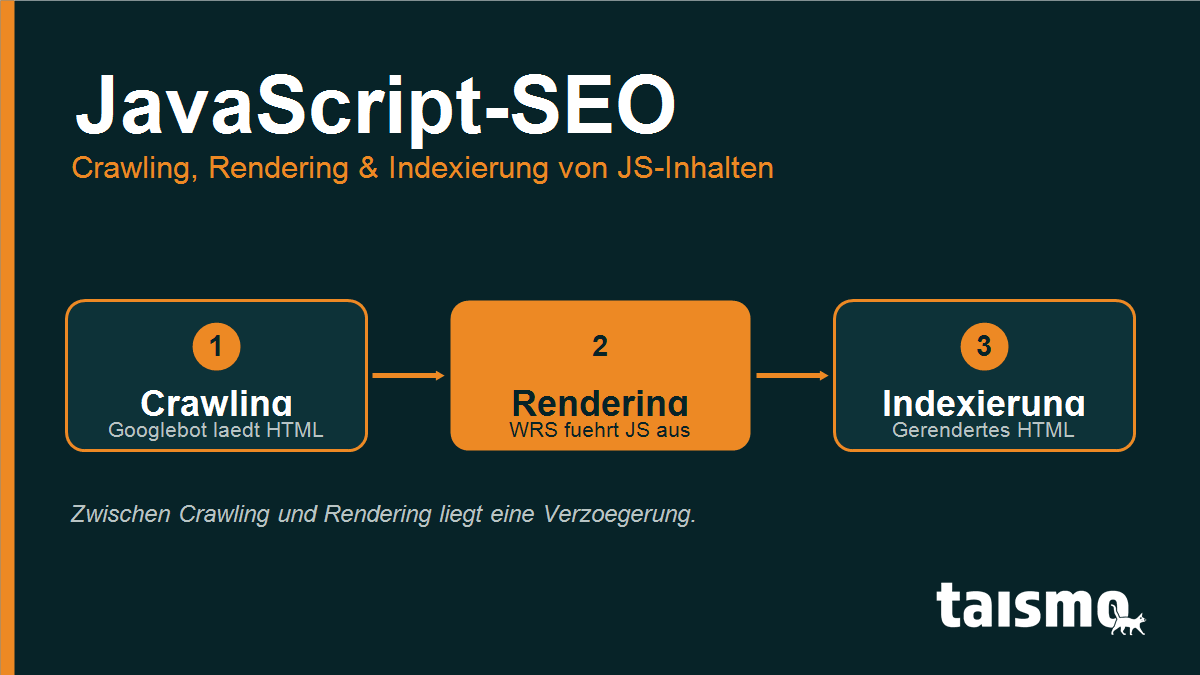
Google processes JavaScript in three separate phases: crawling, rendering and indexing. These phases do not run straight after one another, they are spread over time. That is the central difference to classic HTML pages, where the content is available right away.
- Crawling: Googlebot loads the HTML document of a URL and reads out the links and resources it contains. JavaScript files are recognized at this point, but not yet executed.
- Rendering: The URL moves into a render queue. There the Web Rendering Service (WRS), a current Chromium, executes the JavaScript and builds the final DOM, the way a person would see it in the browser.
- Indexing: Only the rendered HTML is evaluated and indexed. New links that appear during rendering go back into the crawl queue.
The rendering step costs resources and therefore happens with a delay, often minutes to days after the crawling. During that window Google knows the raw HTML only. Anyone who inserts content exclusively with JavaScript is pushing the indexing back.
Which SEO problems does JavaScript cause?
JavaScript causes SEO problems whenever important content or signals appear only after execution and the rendering step does not expose them reliably. The 5 most common pitfalls:
- Content missing from the initial HTML: text and product data live in the rendered DOM only. If the rendering fails, Google indexes a page that is effectively empty.
- Links without
<a href>: navigation throughonclickevents orbuttonelements instead of real<a href="...">links. Googlebot follows real href links only, everything else stays uncrawlable. - Blocked JS resources: if the JavaScript file is blocked through robots.txt, Google cannot render the page and sees the empty shell only.
- Delayed indexing: because of the render queue, fresh content lands in the index later. On news driven or seasonal topics that costs visibility.
- Lazy loading done wrong: content that lazy loading fetches only on scroll or click events stays invisible to Googlebot, because it neither scrolls nor clicks.
On top of that comes performance: heavy JavaScript stretches load times and puts pressure on the Core Web Vitals. Slow pages are not only rated worse, they also burn more rendering resources.
Client-side vs. server-side rendering: what is the difference?
The difference lies in the place where the HTML is created: with client-side rendering (CSR) the browser of the user builds the page with JavaScript, with server-side rendering (SSR) the server already delivers finished HTML. For SEO this decision is central, because it determines what Googlebot finds on its first visit.
- Client-side rendering (CSR): the server sends a minimal HTML plus JavaScript. The browser renders the content afterwards. Google has to render the page itself to see anything, with the familiar delay.
- Server-side rendering (SSR): the server executes the JavaScript and delivers complete HTML. Googlebot sees the content right away while crawling, without waiting for the render queue.
Between those two poles sit hybrid forms. Static site generation (SSG) creates finished HTML as early as build time. Prerendering keeps a pre-rendered HTML version ready for bots. Hydration combines server-side HTML with client-side interactivity. For search engines the rule is simple: the more content already sits in the delivered HTML, the more reliably it gets indexed.
How do you make JavaScript pages SEO-friendly?
JavaScript pages become SEO-friendly when the important content is available in the HTML as early as possible and all resources stay crawlable. The most effective measures, in the order of their leverage:
- Use SSR, SSG or prerendering: render critical content on the server or at build time, so Google finds it without a rendering step of its own.
- Use real links: map every navigation through
<a href="...">. That way Googlebot follows the internal linking reliably. - Release the JS resources: never block JavaScript and CSS files through robots.txt, otherwise the rendering fails.
- Return correct status codes: send a real 404 or 301 even for error pages rendered on the client, never a soft 404.
- Test the rendering: check the rendered HTML with the URL inspection tool of Google Search Console. If the rendered code shows the content, Google sees it too.
Built cleanly, a JavaScript page lands in the index with its full content and appears in the SERP. For websites on React, Angular, Vue or a headless setup, this check belongs to the technical foundation. Anyone who plans or rebuilds such a site should think about JavaScript SEO from the start, and that is exactly part of our work in SEO web design and on the technical side of SEO.
Frequently asked questions about JavaScript SEO
Is JavaScript bad for SEO?
No, JavaScript is not bad for SEO as such. It becomes a problem only when central content is created exclusively with JavaScript and the rendering step does not expose it reliably. Built cleanly, a JavaScript page is just as indexable as a classic HTML page.
Can Google render JavaScript?
Yes, Google renders JavaScript with the Web Rendering Service, based on a current Chromium. The rendering happens with a delay and with limits, though, which is why important content should already sit in the delivered HTML.
What is better for SEO: CSR or SSR?
For SEO, server-side rendering (SSR) is usually the safer choice, because Googlebot sees finished HTML immediately while crawling. Client-side rendering works, but it moves the visibility into the delayed rendering step.
How do I test whether Google sees my JS content?
Use the URL inspection tool in Google Search Console and look at the rendered HTML. If the content you expect appears there, Google can index it too.
Do React, Vue or Angular sites need special SEO measures?
Yes, single page apps on React, Vue or Angular usually need SSR, SSG or prerendering so that their content gets indexed reliably. Without such measures they risk thin or slowly indexed pages.