featured snippet
What is a featured snippet?
A featured snippet is a highlighted answer box at the top of the Google results. It pulls a direct answer out of a page that already ranks and shows it, as a paragraph, a list, a table or a video, ahead of the regular organic results. Because of this prominent placement above the classic position 1, a featured snippet is also called “position 0”. Google decides automatically which page fills the box, and there is no markup you can set for it.
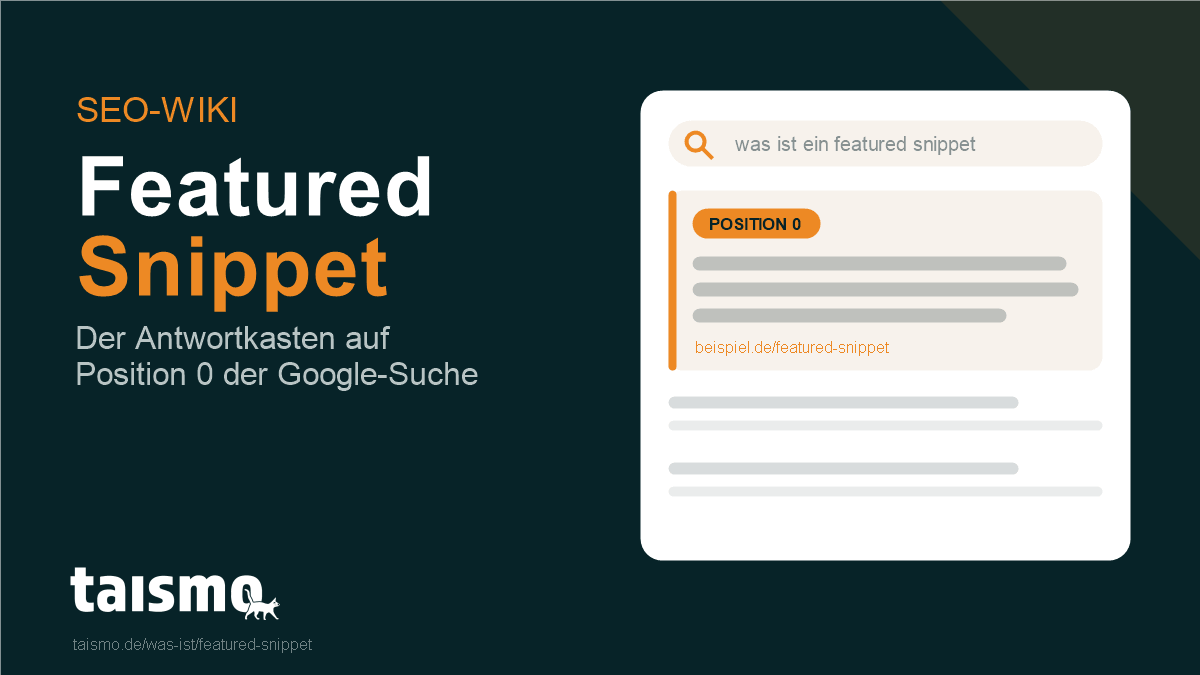
The featured snippet is one of the most eye-catching elements of modern Google search. It answers the query directly on the results page, often without a click being needed. For websites the box is therefore an opportunity and a risk at the same time: it delivers maximum visibility and counts as an authority signal, but it can also mean that people read the answer without ever visiting the source.
The term at a glance
| Attribute | Detail |
|---|---|
| Type of term | SERP feature (search result element) |
| Also known as | position 0, highlighted snippet, answer box |
| Formats | paragraph, list, table, video |
| Steerable via markup | No, Google picks the source automatically |
| Source of the content | a page that already ranks organically for the query (usually top 10) |
| Related terms | SERP, rich snippet, AI Overview, People Also Ask |
Which types of featured snippets are there?
Google shows featured snippets in four basic formats, and which one appears depends on the kind of query. The algorithm picks the format that presents the answer most clearly.
- Paragraph snippet: the most common format. A short passage of roughly 40 to 60 words answers a definition question or a “what is” question. This article itself is built for a paragraph snippet.
- List snippet: a numbered list (for sequences and instructions, “step by step” for example) or a bulleted list (for collections without a fixed order). Google builds the list out of the headings or bullet points of the source page.
- Table snippet: a table for data, prices or comparisons. Google takes over existing HTML tables or turns structured information into a table.
- Video snippet: a highlighted video, usually from YouTube, often with a jump to the relevant passage. It appears for instructions and “how do I” queries.
What does “position 0” mean?
“Position 0” is the unofficial name for the placement of a featured snippet, because the box sits above the first organic result, so ahead of position 1. The term makes clear that this is the most visible spot on the whole SERP.
The page in a featured snippet has to rank organically already, as a rule within the top 10. Google does not promote an unknown page to the top, it lifts a fitting answer out of the existing ranking. When a page holds position 0, its regular result usually does not appear a second time further down, because the snippet takes its place.
There is a flip side. Since the answer already sits on the results page, many people do not click through at all, which is known as “zero click search”. A featured snippet clearly raises visibility and brand perception, but it does not automatically bring more visitors.
Featured snippet vs. rich snippet vs. AI Overview?
Featured snippet, rich snippet and AI Overview get mixed up often, yet they are three fundamentally different SERP elements. The difference lies in where the content comes from and how much control you have.
- Featured snippet: a standalone answer box at the top of the results, fed from one ranking page. Not steerable via markup, Google picks the source itself.
- Rich snippet: not a box of its own, but a normal organic result enriched with extra details such as star ratings, prices or recipe data. A rich snippet comes from structured data (schema.org) on your own page, so you can influence it actively.
- AI Overview: an AI-generated summary at the very top of the results that combines information from several sources and backs it with links. The term AI Overviews explains the details.
In short: the featured snippet quotes one page verbatim, the rich snippet dresses up an existing result, and the AI Overview rewrites several pages into something new. Only the rich snippet can be triggered directly with your own markup.
How do you optimize for featured snippets?
Optimizing for featured snippets means answering the matching question so clearly that Google can take the paragraph over as it stands. There is no markup for it, so structure and wording are what count. The most important levers:
- Rank in the top 10 first: almost every featured snippet comes from a page on the first results page. Without a solid base ranking there is no snippet.
- Answer the question directly: write the answer as a self-contained paragraph of roughly 40 to 60 words, right below a heading that asks the question. That is exactly the pattern every section of this glossary follows.
- Deliver a clear structure: H2 headings as questions, clean lists for steps and tables for comparisons. Google builds list and table snippets straight out of these structures.
- Research question keywords: snippet opportunities sit with “what is”, “how does it work” and “why” queries. Which of your questions already trigger a snippet is something the search results and the reports in Google Search Console will show you.
- Stay concise: no warm-up before the answer. The relevant information belongs in the first sentence after the heading.
Featured snippets are a core building block of modern search engine optimization, both for classic Google visibility and for being quotable in AI systems, which favor the same clearly structured answers. Lifting these opportunities systematically is part of ongoing SEO services.
Frequently asked questions about featured snippets
Can you force a featured snippet with structured data?
No. Unlike a rich snippet, there is no markup for featured snippets. Google picks the source purely on ranking, relevance and the structure of the answer.
Does a featured snippet bring more clicks?
Not always. The box lifts visibility and authority, but it often answers the question in full already (zero click). With complex topics that invite further reading, the click rate frequently goes up instead.
Can you be excluded from a featured snippet?
Yes. The meta tag nosnippet or the attribute data-nosnippet keeps Google from using parts of your text in a snippet. It also removes the page from the prominent position 0 at the same time.
Are AI Overviews pushing featured snippets out?
Partly. Where Google serves an AI Overview, a classic featured snippet shows up less often. Both prefer the same basis, precise and clearly structured answers, so optimizing for one pays into the other.